

Running a Shopify store today is more competitive than ever, and simply listing products is rarely enough to drive consistent growth. Many merchants struggle with low average order values, limited product discovery, and customers abandoning carts without exploring more of what the store offers. Traditional discounting can help, but it often lacks the engagement and personalization needed to influence buying behavior truly.
The goal is to create a shopping experience that not only attracts customers but also encourages them to add more to their cart naturally and enjoyably. This is where build a box Shopify apps come in, allowing merchants to offer customizable bundles that give shoppers control over what they buy while clearly showcasing value. Instead of pushing products, you guide customers through a structured and interactive journey that increases both satisfaction and revenue.
In this blog, we will explore how Build a Box Shopify apps work, its key benefits, essential features to look for, and practical strategies to maximize results. By the end, you will have a clear understanding of how to use bundle building effectively to boost sales, improve customer experience, and create a more scalable ecommerce growth strategy.
The 'build a box' concept is an interactive ecommerce feature that allows customers to create their own product packages. Instead of purchasing a pre-set kit, shoppers can handpick items from a curated selection to create custom bundles that perfectly match their needs and preferences. This model is incredibly versatile and can be applied to a wide range of industries, from gourmet food and beauty products to subscription boxes and gift sets.
At its core, a build a box experience is powered by a sophisticated bundle builder with specific bundle logic. You, the merchant, define the rules, such as the number of items required, the categories to choose from, or the total price. The customer then navigates this guided process, adding their desired products to a virtual box. This turns a standard purchase into a fun, personalized, and engaging activity, making the customer feel more connected to the products they buy.
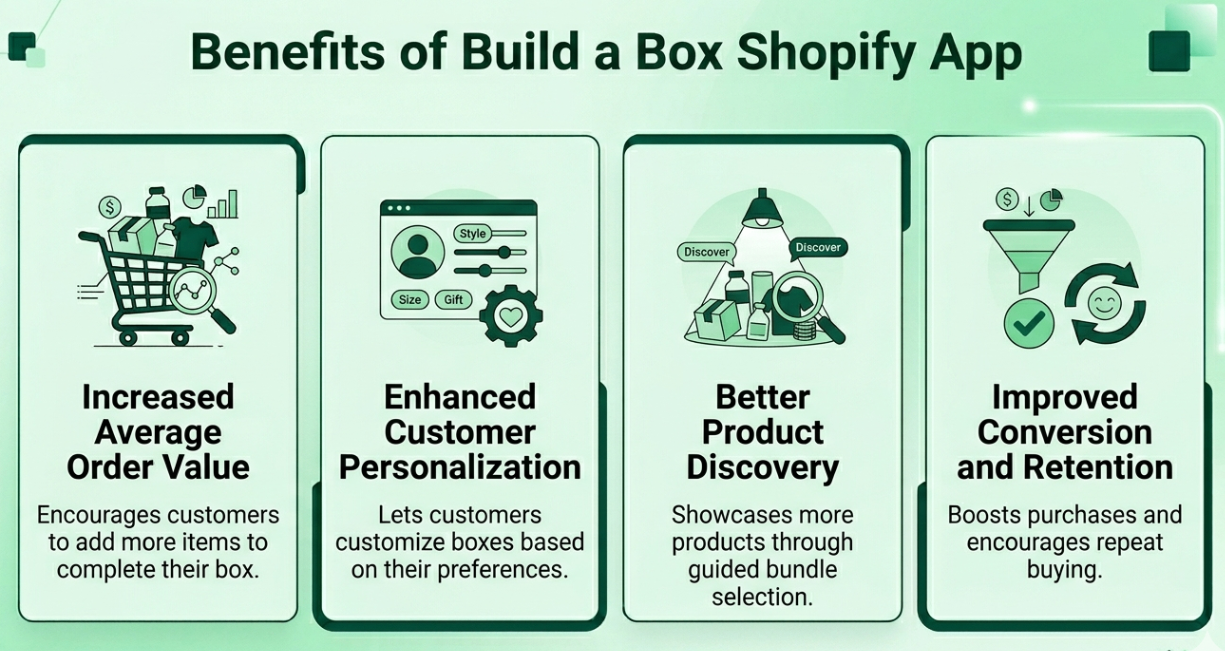
Integrating a build a box bundle app into your Shopify store unlocks a suite of powerful benefits that can drive significant growth. The primary advantage is a direct increase in average order value (AOV), as customers are naturally guided to purchase multiple items at once. This product bundling strategy transforms the shopping journey from a simple transaction into a personalized, interactive experience.
Below, we'll explore the benefits of Build a Box Shopify apps in greater detail.
One of the most immediate advantages of using a BuildaBox app shopify solution is its ability to increase average order value by encouraging customers to purchase multiple items in a single transaction. Instead of a single-product purchase, shoppers are guided to fill a box, often motivated by tiered pricing, quantity breaks, or volume-based discounts that reward higher spending. This approach makes larger purchases feel intentional and value-driven rather than forced. A well-structured Shopify build a box app supports these pricing strategies seamlessly, and Kefi Product Bundle Builder enhances this by helping merchants present bundle options in a clear, structured way that naturally encourages customers to add more items to their box.
A build a box app builder transforms the shopping journey into a personalized experience by allowing customers to create bundles that reflect their preferences and needs. Whether it is selecting product variants, adding custom messages, or choosing items based on themes, this flexibility makes the experience more engaging and memorable. Customers feel a stronger connection to what they are building, which increases satisfaction and perceived value. The best build a box Shopify app options make this customization simple and intuitive, and Kefi Product Bundle Builder complements this by offering a guided bundle-building flow that balances flexibility with ease of use, ensuring personalization does not come at the cost of usability.
A well-designed build-a-box app Shopify setup also improves product discovery by exposing customers to a curated selection of items during the bundle-building process. Instead of browsing through a large catalog, shoppers interact with a focused set of products that are intentionally grouped, making it easier to explore and try new items. This approach increases visibility for complementary or lesser-known products while creating natural upsell opportunities. A thoughtful Shopify build-a-box app effectively enables this curated experience, and Kefi Product Bundle Builder supports it by helping merchants organise products into logical bundle flows that guide customers to discover more of the store's offerings.
A strong best build a box shopify app strategy not only drives initial sales but also improves long-term customer retention by creating a more engaging and rewarding shopping experience. The combination of customization, perceived savings, and interactive selection reduces hesitation and encourages customers to complete their purchase. Over time, these positive experiences build trust and increase the likelihood of repeat purchases. A reliable build a box app builder ensures that this process remains smooth and consistent. At the same time, Kefi Product Bundle Builder contributes by delivering a clean, user-friendly bundle experience that strengthens both conversion rates and customer loyalty without feeling overly promotional.
Also Read: How Calitron Boosted Revenue and AOV with Smart Bundling.
Selecting the right bundle builder is crucial for bringing your build a box vision to life. The Shopify App Store offers a wide range of options, each with its own unique features, pricing structures, and strengths. The best app for your store will depend on your specific needs, such as the complexity of your bundles, your budget, and the level of customization you require.
Let’s examine what each of these leading build a box Shopify apps has to offer.
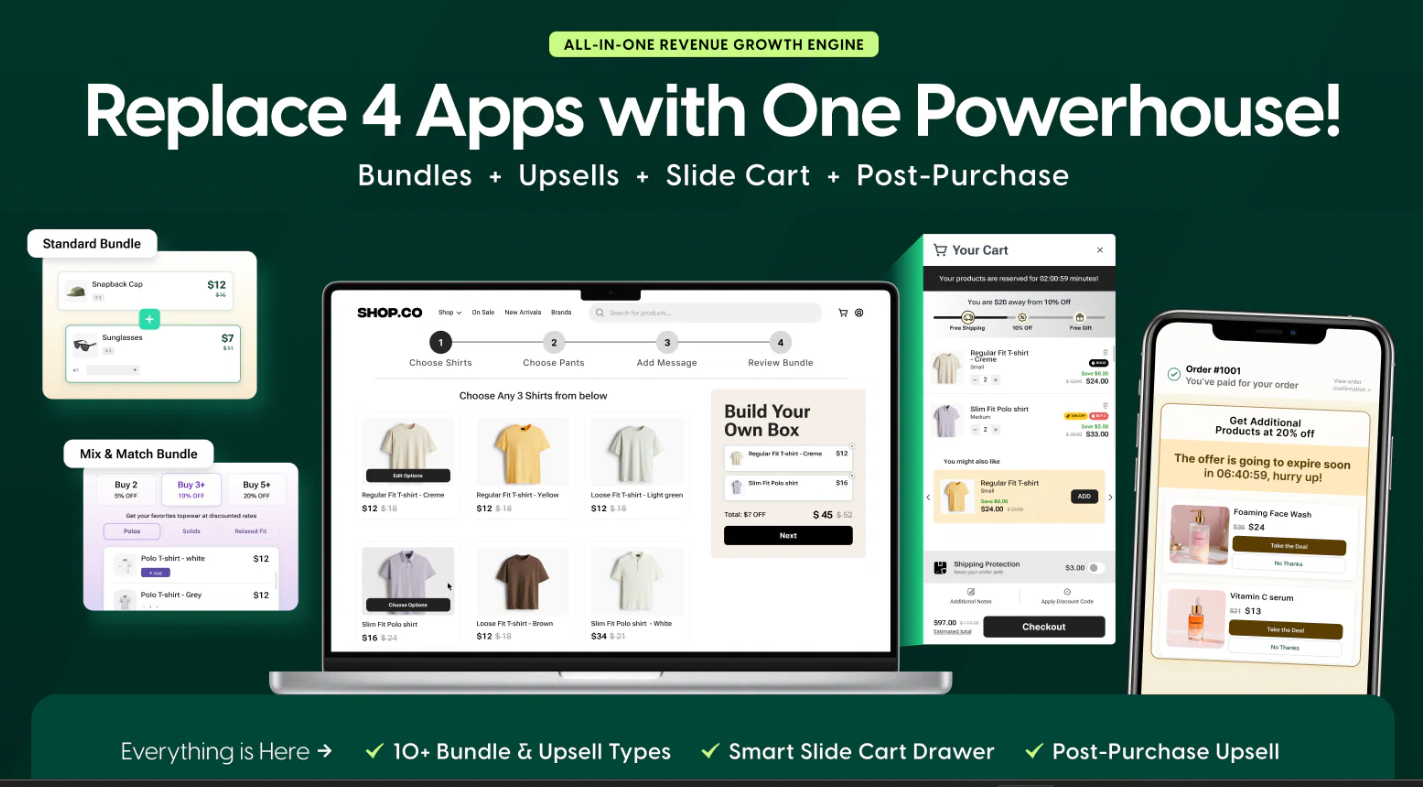
Source: Kefi Product Bundle Builder
The Kefi Product Bundle Builder is a premier solution for Shopify merchants seeking to offer sophisticated, highly customizable bundle experiences. It provides an intuitive yet powerful interface that lets you create everything from simple mix-and-match bundles to complex, multi-step build-a-box pages. Kefi’s strength lies in its flexible bundle logic, which gives you complete control over the customer journey.
With Kefi, you can set precise rules for your bundles, such as minimum and maximum quantity requirements, and guide customers through a seamless selection process. The builder is designed to integrate seamlessly with your online store's theme, ensuring a cohesive, professional look that builds trust and drives conversions. To set up a build a box page using this Shopify app, simply install Kefi, configure your desired bundle rules directly within the app, and customize the look to match your store's branding. Once set up, customers can easily mix and match products into their own bundles, enhancing both engagement and average order value. This focus on both functionality and aesthetics makes it a top choice for brands that prioritize user experience.
Kefi is a strong choice for merchants looking to create a clean, structured bundling system that aligns with how customers naturally build higher-value carts. Instead of relying on multiple overlapping discount or promotion apps, it offers a more streamlined experience through guided bundle creation and intuitive product grouping. This approach makes it adaptable across different store types, whether the goal is to simplify the buying journey, improve conversions, or steadily increase average order value through smarter purchasing-flow design over time.
Also Read: How Puur Scaled Average Order Value via Intelligent Accessory Pairing.
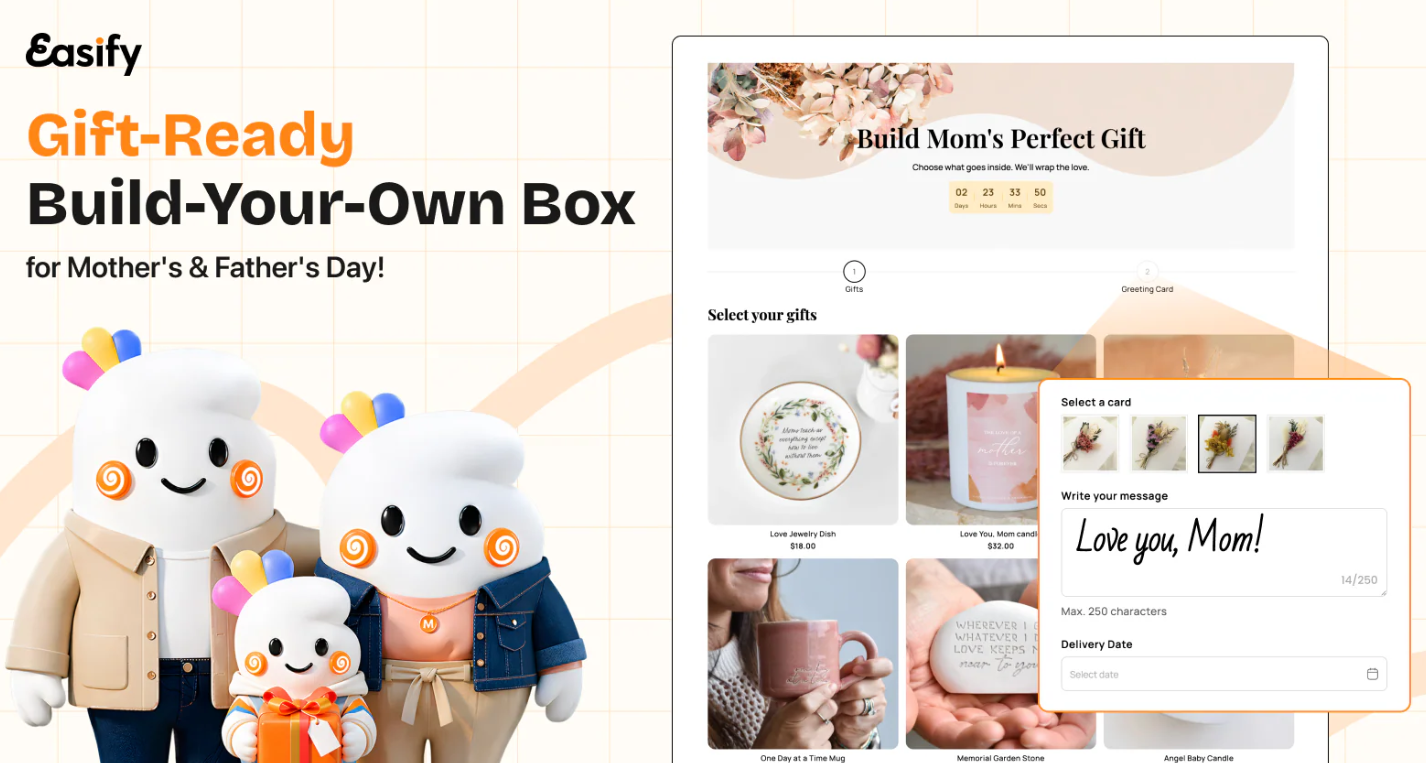
Source: Easify Box Bundle Builder BYOB
Easify Box Bundle Builder BYOB is a highly-rated app celebrated for its ease of use and powerful features. It enables merchants to launch professional-looking 'Build Your Own Box' (BYOB) pages in minutes, thanks to over 30 pre-built templates. The app focuses on making product bundling both easy and profitable, helping you create flexible bundles that effectively increase your average order value. One of Easify's standout features is its visual editor, which gives you complete control over the design of your bundle pages. You can customize headings, banners, colors, and layouts to match your brand's aesthetic perfectly. The app also supports a wide range of discount options, including tiered pricing and volume discounts, allowing you to create compelling offers that incentivize customers to buy more.
Easify Box Builder is a compelling option for merchants seeking a highly visual, structured build your own bundle experience that guides customers step by step, making it especially effective for improving engagement and basket size through a curated journey. It works well for brands that want a controlled, experience-driven bundling flow rather than a standard cart interaction. However, for stores that prefer greater flexibility in how bundles are presented and integrated across the shopping journey, apps like Kefi Product Bundle Builder can feel more adaptable by allowing bundle creation to fit naturally into different parts of the store rather than a fixed step-by-step flow.

Source: Bundler - Product Bundles App
Bundler is a popular and highly versatile app that helps merchants increase sales through a wide variety of bundle offers. While it supports classic 'frequently bought together' and percentage-based discounts, its strength also extends to creating build-a-box style product bundle promotions. The app is designed to boost your AOV by making it easy to present compelling deals to your customers. Bundler is also compatible with Shopify POS, making it a great option for businesses with both an online and a physical retail presence. With features like custom bundle images and seamless integration with subscription apps, Bundler provides a comprehensive toolkit for any merchant looking to leverage product bundling across their entire business.
Bundler is a practical option for merchants who want a simple yet capable bundling system that supports mix-and-match bundles, BOGO offers, and quantity-based discounts without complex setup. It works well for stores that need flexibility and quick deployment while maintaining a smooth customer experience as they scale. However, for brands that prioritize a more guided and curated bundle-building experience, apps like Kefi Product Bundle Builder can feel more tailored by offering stronger control over how bundles are presented and built, helping shape customer decisions more intentionally rather than leaving most of the structure open-ended.
Also Read: How Minimal Home Redefined Interior Elegance through Strategic Upselling.

Source: BYOB ‑ Build Your Own Bundles
BYOB ‑ Build Your Own Bundles is an app that focuses squarely on the 'build your own' experience. It empowers merchants to offer highly customizable bundles, allowing customers to mix and match different bundle products to create their perfect package. This app is ideal for stores that want to put the power of choice directly in their customers' hands. The bundle builder within the app is designed to be flexible, supporting various configurations for your custom bundles. You can set rules to ensure that bundles are created according to your specifications, such as requiring a certain number of items from different collections. This enables creative and structured bundle offerings such as gift boxes, sample packs, or personalized kits.
BYOB is an ideal option for merchants who want a dedicated build a box page that gives customers control over product selection within a structured flow. However, as stores scale, many brands prefer approaches that extend bundle building beyond a single page and integrate it across the shopping journey. In such cases, apps like Kefi Product Bundle Builder often feel better aligned with long-term growth by offering greater flexibility and a more fluid bundle-creation experience that supports higher cart values.
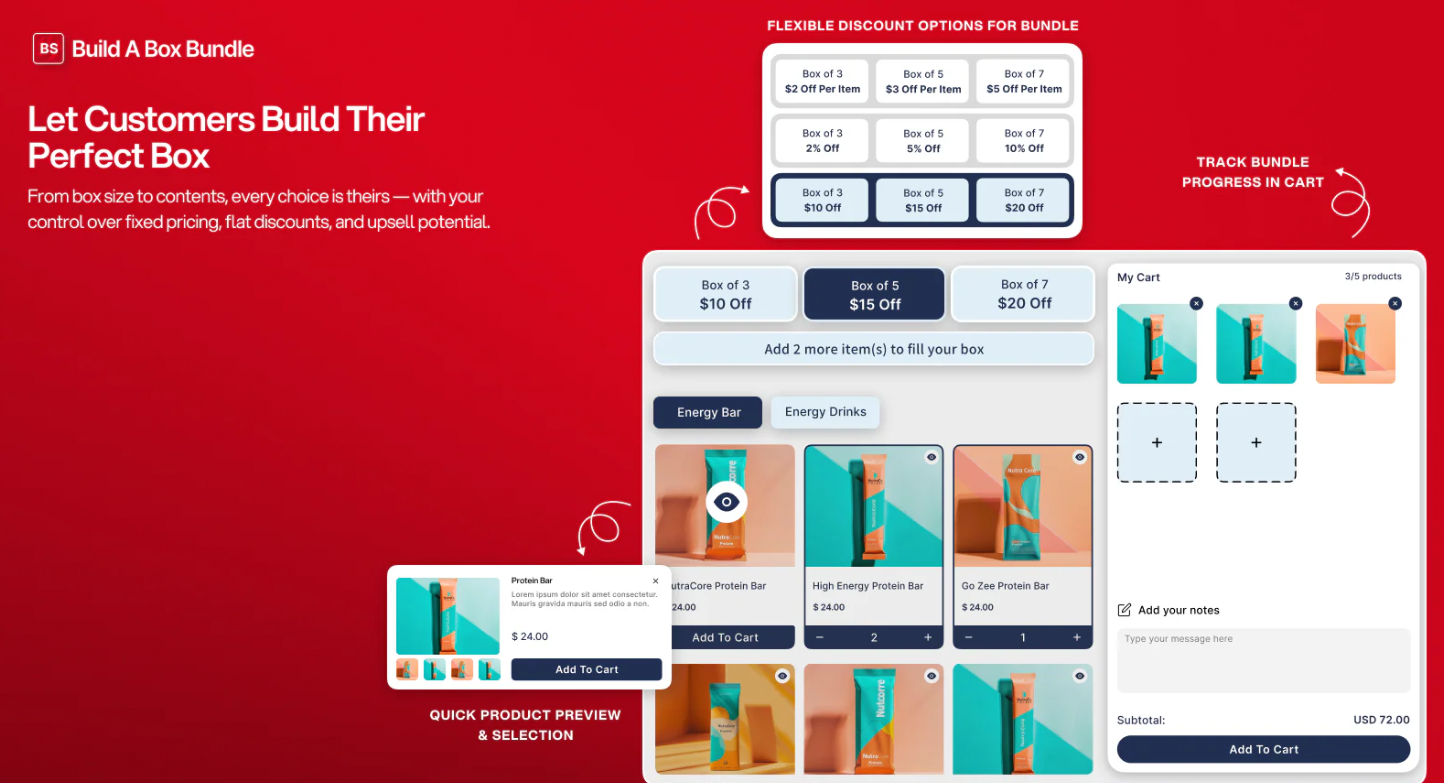
Source: BundleSuit Bundle Builder BYOB
BundleSuit Bundle Builder BYOB is a strong contender in the build a box space, praised for its powerful features and user-friendly interface. It allows merchants to effortlessly create mix-and-match and build-a-box experiences that drive up the average order value. The app is built to meet Shopify's highest standards, ensuring smooth performance and seamless integration. The bundle builder itself is robust, offering customization options to match your store’s branding and advanced logic to control how bundles are built. With features designed to maximize conversions and a supportive customer service team, BundleSuit provides a comprehensive solution for businesses of all sizes looking to implement a successful BYOB strategy.
BundleSuite is a strong choice for merchants who want a highly flexible bundling system that supports everything from simple mix-and-match offers to complex pricing rules. It works well for stores needing deep customization and control over bundle structures. However, as stores grow, managing multiple bundle types and rules can become complex, and some brands prefer simpler systems. In such cases, apps like Kefi Product Bundle Builder feel more aligned with long-term growth by offering a cleaner, more guided bundle-building experience.
Also Read: How SportsStop Dominated the Diamond and Field with High-Velocity Bundling.

Source: Easy Bundle Builder
EB | Easy Bundle Builder, BYOB lives up to its name by providing a straightforward and intuitive platform for creating custom boxes and mix-and-match bundles. It is recognized as a high-quality app that meets Shopify's strict standards for performance and design, making it a reliable choice for merchants. The app is engineered to help you increase sales by making it simple for customers to build their own personalized product collections. Easy Bundle Builder is particularly well-suited for businesses that want to offer custom boxes for gifts, subscriptions, or curated product kits. Its focus on simplicity does not come at the expense of power, as it provides the essential features needed to launch and manage effective bundling campaigns that enhance the customer experience and drive revenue.
EB is a strong choice for merchants seeking a highly customizable, interactive bundle builder with advanced logic and design flexibility. It works especially well for brands that want to create visually rich, guided bundle experiences and integrate them with subscriptions or other apps. However, as stores scale, some merchants prefer systems that simplify the bundling experience into a more streamlined and conversion-focused flow rather than relying heavily on layered customization. In that context, solutions like Kefi Product Bundle Builder often feel more aligned with long-term growth by combining structured bundle flows, quantity breaks, and Buy X Get Y logic into a single, easier-to-manage system.
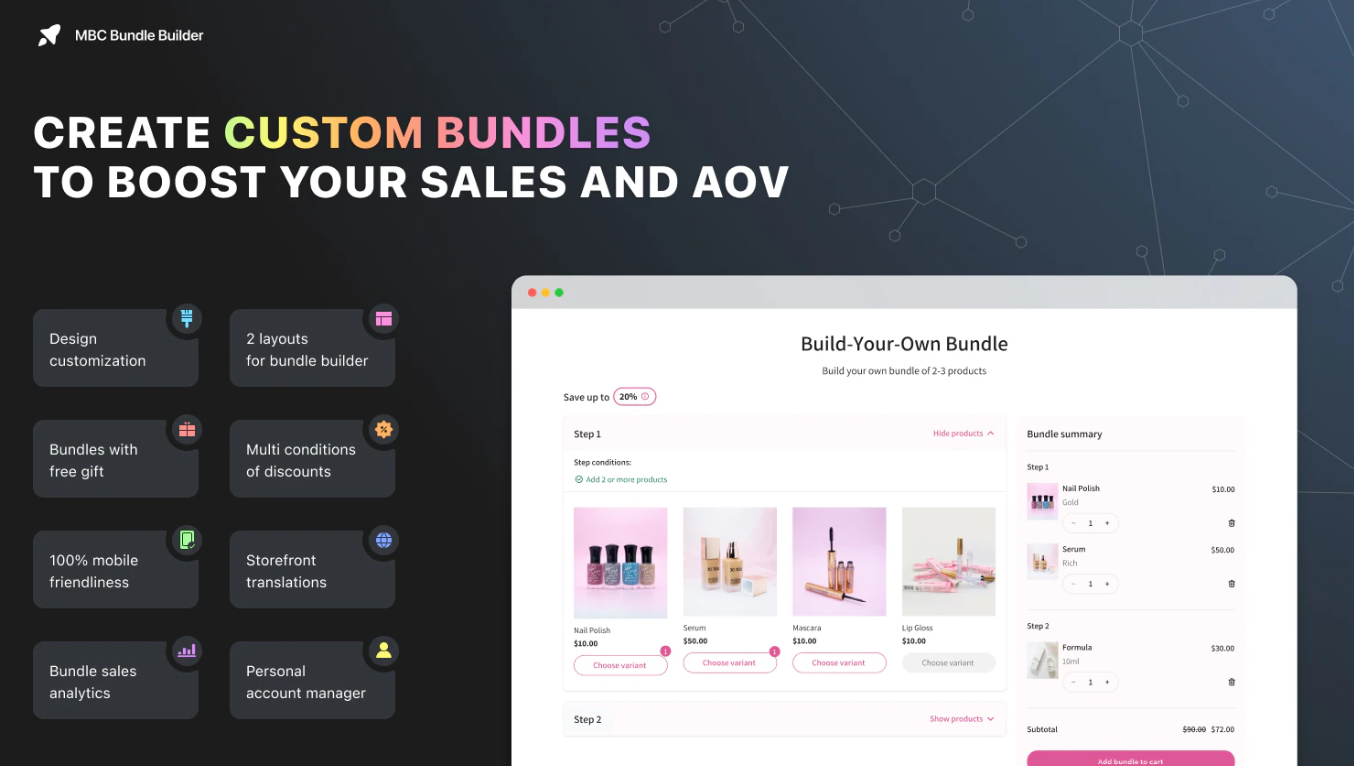
Source: MBC Bundle Builder BYOB
MBC Bundle Builder BYOB stands out for its intuitive design and customer-centric functionalities, allowing shoppers to craft their own bundles with ease. The app supports various bundle types and offers tiered pricing, enhancing both the shopping experience and average order value. Users can create custom boxes and leverage bundle logic to match options with customer preferences. Additionally, the ability to integrate seamlessly with Shopify ensures that store owners maintain high standards of customer service while boosting overall sales channels.
MBC Bundle Builder is a solid choice for merchants who want flexible bundle creation with both simple and multi-step experiences. It works well for stores that want to offer mix-and-match bundles and customizable kits without complex setup. However, as stores scale, managing multiple bundle rules and configurations can become layered. Many growing brands start leaning toward more streamlined systems that guide customers through a cleaner, more structured bundle journey. In that context, solutions like Kefi Product Bundle Builder often feel more aligned with long-term growth by simplifying how bundles are created and experienced rather than adding more configuration layers.
Also Read: How Squaties Scaled Order Volume via Performance Bundling.

Source: Simple Bundles & Kits
Simple Bundles & Kits offers a user-friendly approach to product bundling, ensuring store owners can create custom bundles effortlessly. This app facilitates seamless Shopify integration, enabling merchants to curate items into unique kits that enhance the shopping experience. With features like tiered pricing and volume discounts, it effectively boosts average order value (AOV). Customers benefit from a streamlined checkout process, fostering loyalty and improving order history tracking. The focus on ease of use also elevates overall customer satisfaction, making it a favorite among Shopify merchants.
Simple Bundles is a strong choice for merchants who prioritize backend accuracy, operational efficiency, and bundling. It works especially well for stores with complex inventory setups where fulfillment and SKU tracking are critical. However, for brands that prioritize a more guided, front-end 'build your own bundle' experience focused on conversion and customer journey, more streamlined bundle-first systems can feel easier to manage. In those cases, apps like Kefi Product Bundle Builder often align better with long-term growth by focusing on structured bundle flows and intuitive customer experiences rather than operational complexity alone.

Source: BOLD Bundles ‑ Product Bundles
Creating custom product bundles has never been easier than with Bold Bundles, a powerful Shopify app designed to elevate your online store. It allows store owners to craft unique bundles that cater to different customer preferences while seamlessly integrating discount rules such as volume or tiered pricing. This boosts average order value (AOV) and offers a tailored shopping experience that keeps customers engaged. Moreover, the user experience is enhanced with intuitive interfaces and easy management of bundle products. Finished bundles can be showcased on dedicated bundle pages, improving product visibility and encouraging purchases, ultimately fostering customer loyalty. By using this smart tool, Shopify merchants can gain a competitive edge while offering compelling shopping options that resonate with their clientele.
BOLD Bundles is a solid choice for merchants who want a simple and reliable way to create product bundles and volume discounts without overcomplicating their setup. It works well for stores that focus on straightforward promotions like kits, packs, and quantity-based offers. However, as stores scale and require more advanced 'build a box' experiences, merchants often look for solutions that guide customers through structured bundle creation rather than relying mainly on static bundle setups. In such cases, apps like Kefi Product Bundle Builder tend to feel more aligned with long-term growth by offering more dynamic, customizable, and conversion-focused bundle flows.
Also Read: How Lifetime Technologies went from a Single Additive to System Kits.

When choosing a build-a-box shopify app, it’s essential to look beyond basic functionality and evaluate the key features that will truly empower your business. The right bundle builder should not only allow you to create custom bundles but also provide the flexibility, control, and insights needed to maximize your success. Key considerations include the app's configuration options, pricing capabilities, and ease of use.
We will now explore the essential features to prioritize when selecting the best possible tool for your store.
A powerful build-a-box app for Shopify should give you complete control over how your bundles are structured, allowing you to design offers that feel both flexible and intentional. From setting minimum and maximum item limits to creating step-by-step selection flows, the ability to define how customers build their box is essential for both usability and conversion. This level of control ensures that bundles remain valid while still giving customers freedom of choice. A well-designed Shopify build a box app makes these configurations easy to manage, and Kefi Product Bundle Builder supports this by enabling merchants to create structured yet flexible bundle experiences that feel intuitive and engaging.
Pricing plays a central role in how compelling your bundle offers are, which is why advanced discount logic is a must-have in any build a box app builder. Instead of relying on flat discounts, you should implement tiered pricing, volume discounts, or fixed-bundle pricing to encourage customers to add more items to their box. These dynamic pricing strategies align with customer behavior by clearly motivating rewarding higher-value purchases. The best build a box Shopify app options handle this seamlessly, and Kefi Product Bundle Builder complements this by allowing merchants to apply structured pricing rules that enhance perceived value while increasing overall revenue.
For a smooth and cohesive shopping experience, your Build a Box Shopify app must integrate seamlessly with your store’s design and functionality. The bundle builder should feel like a natural extension of your website rather than a separate tool, which helps build trust and maintain brand consistency. Customization options such as theme matching, flexible layouts, and the ability to add personalized fields enhance both aesthetics and usability. A reliable Shopify build a box app ensures this level of integration. At the same time, Kefi Product Bundle Builder supports it by offering clean, adaptable interfaces that align with your store’s branding and provide a consistent experience across devices.
Behind every successful bundle strategy is a strong operational foundation, which makes inventory sync and analytics essential features in a build a box app builder. Real-time inventory updates ensure that stock levels remain accurate as bundles are purchased, preventing overselling and fulfillment issues. At the same time, performance tracking provides insights into which bundles drive sales, which products are most popular, and how your offers affect average order value. The best build a box Shopify app solutions combine reliability and data visibility, and Kefi Product Bundle Builder supports this by helping merchants manage inventory efficiently and using data to continuously refine and improve their bundling strategy.
Also Read: How Metalbird drove consistent growth across 8 stores.
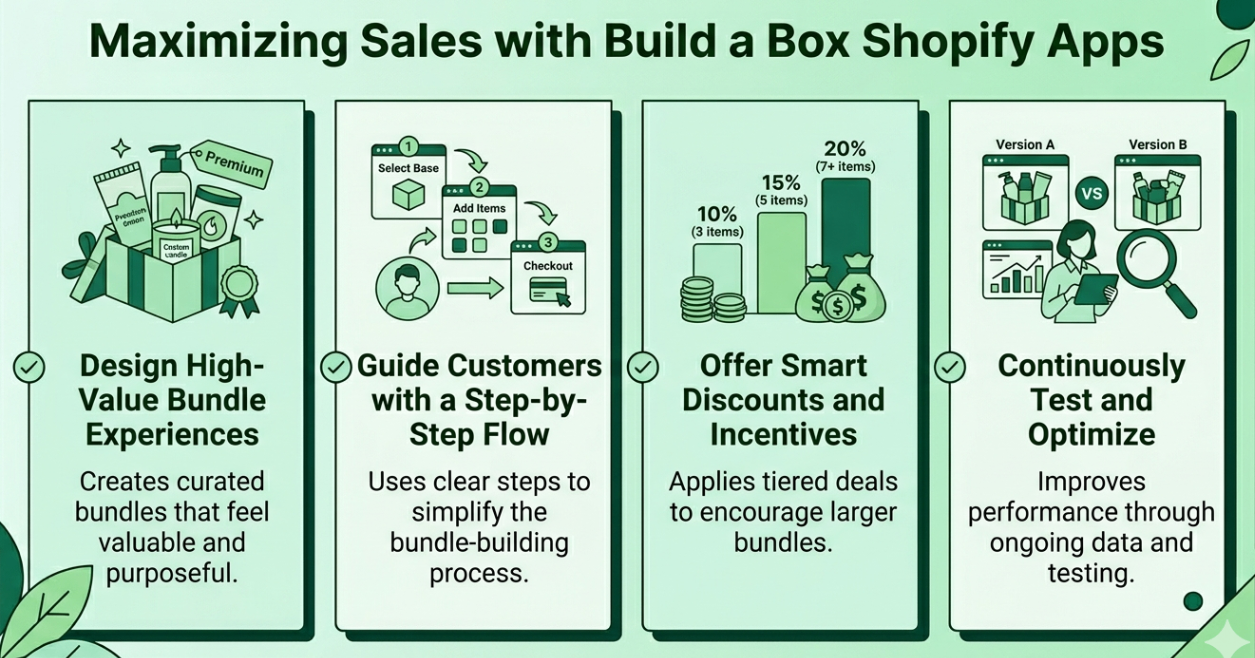
Simply installing a build a box app is only the first step. To truly maximize sales and achieve a significant return on your investment, you must approach your bundle offers strategically. A successful strategy focuses on guiding the customer through a rewarding journey that not only increases their immediate order value but also builds long-term brand affinity. By optimizing every aspect of your bundle builder, you can transform it from a simple feature into a powerful sales engine.
The following tips will help you do just that.
To maximize results with a build a box app Shopify, the focus should be on creating bundles that feel curated, valuable, and worth exploring rather than just discounted. Customers respond better to themed or purpose-driven bundles, such as starter kits, essentials packs, or occasion-based boxes, because they simplify decision-making and increase perceived value. A well-balanced mix of best-sellers and discovery products further enhances this experience by combining familiarity with exploration. The best build a box Shopify app solutions support this kind of structured curation, and Kefi Product Bundle Builder complements it by helping merchants design bundles that feel intentional and premium without adding complexity to the setup.
A smooth and intuitive experience is essential for converting interest into completed purchases, which is why a guided flow plays a critical role in any Shopify build-a-box app strategy. Breaking the bundle-building process into clear, manageable steps helps customers move forward confidently without feeling overwhelmed. Elements such as progress indicators, logical product grouping, and clear instructions make the journey more engaging and easier to complete. A well-designed build a box app builder should prioritize usability, and Kefi Product Bundle Builder aligns with this by offering a clean, step-by-step structure that keeps customers focused while making the entire process feel simple and rewarding.
Strategic incentives are key to encouraging customers to build larger bundles and increase overall order value. Instead of relying on flat discounts, a build a box app Shopify should support dynamic pricing models such as tiered discounts, volume-based savings, or exclusive bundle-only perks. These approaches tap into the customer’s desire to maximize value, often leading them to add more items to unlock better rewards. The best build a box Shopify app options make these incentives easy to implement and clearly visible. At the same time, Kefi Product Bundle Builder enhances this by structuring pricing in a way that feels transparent and motivating without being overly promotional.
Long-term success with a build a box app builder depends on ongoing optimization rather than a one-time setup. By regularly analyzing performance data such as conversion rates, average order value, and product popularity within bundles, you can identify what works and refine your strategy accordingly. Testing different bundle structures, pricing tiers, or product combinations helps uncover new growth opportunities. A reliable Shopify build a box app should provide the insights needed for this process, and Kefi Product Bundle Builder supports continuous improvement by making it easy to adjust bundle configurations and evolve your strategy based on real customer behavior.
Also Read: How a Premier Portuguese Winery Cultivated a +16.80% AOV Lift.
Kefi Product Bundle Builder is specifically engineered to help you boost AOV through its powerful, flexible build-a-box capabilities. You can leverage Kefi’s advanced bundle logic to create compelling offers that naturally guide customers toward a higher order value. For instance, set up a multi-step builder where customers select items from different categories. Then, implement tiered pricing that rewards them with a larger discount as they fill their box, making it easy to add more items.
To allow customers to mix and match products, use Kefi’s bundle builder to create a new 'Build Your Own Box' page. Within the builder, you can define which collections or specific products are available for selection. Structure the experience with clear steps and set minimum/maximum quantity rules, for example, 'Choose any 5 snacks to complete your box.' By dynamically displaying savings as customers add items, Kefi makes the value proposition clear, encouraging them to fill their cart and significantly boosting the average order value.
Book a Demo to see how Kefi Product Bundle Builder works.
Utilizing the Build a Box Shopify app can significantly elevate your Ecommerce strategy by enhancing customer engagement and driving sales. By allowing customers to personalize their shopping experience, these apps not only increase average order value but also foster brand loyalty. When selecting the right app for your store, prioritize features like flexible configuration, advanced pricing options, and seamless integration. Moreover, continuously optimizing the customer journey through strategic discounts and engaging bundle experiences will ensure sustained growth. To take the next step in transforming your online store, consider exploring a free trial of one of the top Build a Box apps today. Embrace this innovative approach, and watch your sales soar!
A build a box app enhances the customer experience by offering personalization and choice. This engaging process leads to higher satisfaction and increased sales. The bundle app format naturally encourages purchasing multiple items, directly boosting the average order value and overall revenue for your store.
First, install a Shopify app with a bundle builder. In the app's dashboard, you'll create a new bundle, select the products to include, and define the rules (e.g., quantity). The app will then generate the code or template for your online store pages to display the custom boxes.
Look for key features such as a flexible bundle builder, bundle discount options, and real-time inventory sync. The best apps for creating custom bundles also prioritize ease of use, offer deep customization to match your store's theme, and provide detailed analytics to track performance.
Use a Shopify app with a 'mix and match' bundle builder. Within the app, you define the bundle logic, such as selecting a specific number of items from a designated collection. The app generates a page where customers can create their custom bundles by choosing from the products you've made available.
A Shopify build a box app offers a more structured, guided experience where customers fill predefined slots, unlike basic bundles that simply group products together.
A build a box app builder is ideal for brands that want to offer customizable product bundles, improve customer engagement, and guide shoppers toward higher-value purchases through a structured buying experience.
Many successful stores in the food, beauty, and gift industries use a bundle builder. Brands like Caraway often showcase curated sets, while snack companies allow customers to build their own variety packs. These case studies prove that offering bundle products is a powerful way to increase average order value.
No, most modern Shopify apps are designed for ease of use. Installation is typically a one-click process from the Shopify App Store. The best bundle builder apps offer intuitive interfaces and guided setup, making it straightforward for any store owner to create and launch bundles without technical expertise.
.svg)
