Now, let’s take a closer look!
If you are trying to increase average order value on your Shopify store, product bundling has probably crossed your mind already. And for good reason, bundling is one of the simplest ways to get customers to spend more while feeling like they are getting a better deal.
Here is something most store owners discover early on: Shopify already includes native features that let you create simple bundles, product kits, and volume offers right out of the box. No extra setup, no learning curve. Just your store, doing more.
For many merchants just starting out, these built-in methods work surprisingly well. They help with product discovery, push cart values higher, and give you a real sense of which products customers naturally reach for together.
And the benefits go beyond a single sale. When customers explore more of your catalogue through bundles, they tend to come back. That kind of organic retention adds up over time.
In this guide, you will learn how to create bundles on Shopify using its native features, which approaches work best for different store types, and how to build offers that drive both immediate conversions and long-term growth.
Shopify product bundles are simply groups of related products sold together as one offer instead of separate purchases. You have probably seen this with skincare kits, coffee starter packs, matching fashion sets, or gaming setups.
For example:
Bundles work well because they make shopping easier for customers. Instead of searching for individual items across your online store, shoppers get a ready-made solution in one place. They also help boost sales by increasing perceived value through a better bundle price.
Some of the biggest advantages include:
According to e-commerce studies, product bundling often improves both conversions and cart value compared to standalone product purchases.
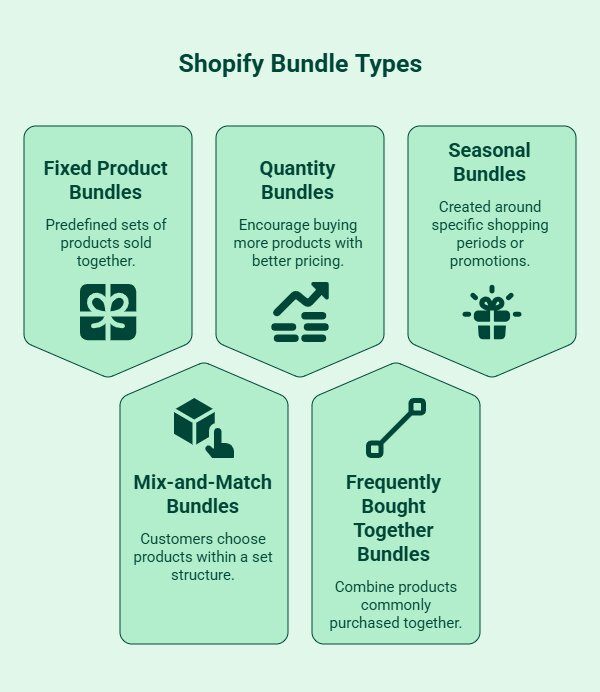
Not every Shopify bundle works the same way. The right setup usually depends on your products, customer behavior, and how much manual management you are comfortable handling.
Some bundles are simple to create using native Shopify features, while others need more advanced functionality.
Fixed bundles include the same products every time. Customers purchase a predefined set without making changes.
Common examples include:
These are the easiest bundles to create manually and work well for most small Shopify stores.
Mix-and-match bundles let customers choose products within a set structure.
For example:
These bundles create a more personalized shopping experience but usually require additional functionality once your catalog grows.
Quantity bundles encourage customers to buy more products at once through better pricing or volume discounts.
Common examples include:
This approach works especially well for consumable or repeat-purchase products.
These bundles combine products that customers commonly purchase together.
Examples include:
This type of product bundling improves convenience while increasing average order value naturally.
Seasonal bundles are created around specific shopping periods or promotions.
Popular examples include:
These bundles often perform well because they create urgency around limited-time offers.
Looking for more advanced ways to increase average order value on Shopify? Explore our guide on the best bundle apps for Shopify to compare top tools for product bundling, volume discounts, mix-and-match offers, and conversion-focused bundle strategies.
Yes. Shopify already includes several native features that support simple product bundling without requiring additional apps. For many Shopify stores, especially smaller catalogs, these manual setups are often enough to test bundle demand and increase average order value initially.
You can create bundles using:
These methods work best for:
Starting with native Shopify bundles also helps merchants understand:
However, native Shopify bundles do have limitations. Inventory syncing is usually the biggest challenge because Shopify does not automatically track bundled inventory across multiple product listings. If a bundled item sells out individually, the bundle may still appear available unless manually updated.
As bundle complexity grows, managing pricing, inventory, and product availability manually can become time-consuming. But for many Shopify stores, native bundle setups are still a practical way to validate demand and improve conversions before investing in more advanced bundle functionality.
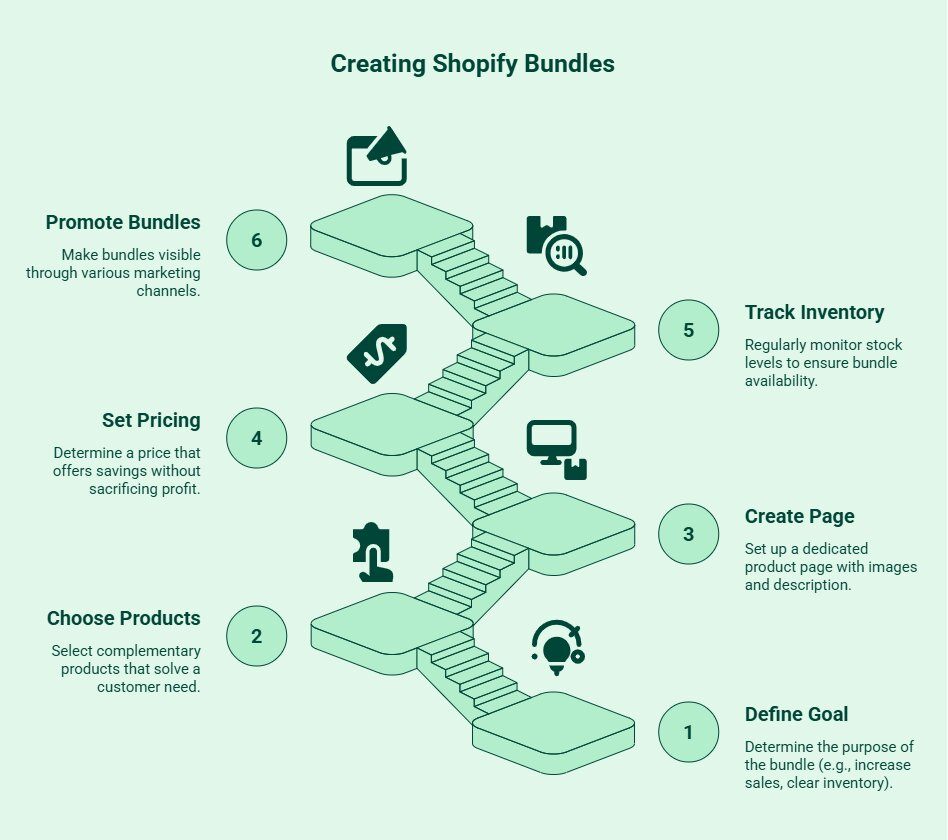
Creating Shopify bundles without an app is much simpler than it sounds. You do not need coding skills or advanced Shopify experience. In most cases, a dedicated product page and a few native Shopify features are enough to get started.
Start by deciding what you want the bundle to achieve.
Your goal could be to:
This helps shape your pricing, product selection, and promotions.
The best bundles solve a complete customer need instead of grouping random products.
For example:
Keep the combination practical and easy to understand.
Inside Shopify admin:
Your bundle page should clearly explain:
Strong product pages reduce hesitation and improve customer confidence before checkout.
Bundle titles should immediately explain the offer, such as:
Use product images that clearly show every included item together instead of relying only on individual product photos.
Your pricing should communicate value without hurting profitability. The goal is to encourage larger purchases, not to create unnecessary margin pressure.
Common pricing strategies include:
Showing comparison pricing, such as “Save $25 compared to buying separately,” usually helps customers understand the value faster.
Inventory management is usually the biggest operational challenge with manual Shopify bundles.
Because Shopify does not automatically sync bundled inventory natively, one product selling out separately can leave the bundle incorrectly showing as available. This creates overselling risks, fulfillment delays, and customer support issues.
To reduce inventory problems:
For smaller catalogs, manual inventory management is usually manageable. But as bundle complexity grows, inventory tracking can become significantly harder without automation.
Bundles usually perform best when they appear naturally during the shopping experience instead of feeling like generic promotions.
Focus visibility on high-intent areas such as:
Visual platforms like TikTok, Instagram Reels, and Pinterest also work especially well for demonstrating bundle use cases, routines, or complete setups in action.
A simple bundle setup with clear pricing, strong product combinations, and good visibility is often enough to start boosting sales without relying on extra apps.
There is no single method that works for every Shopify store. The right setup depends on your product catalog, bundle complexity, and how much manual management you are comfortable handling.
Here is a quick comparison of the most common Shopify-native bundle methods.
This is the simplest native Shopify bundle setup. You create a dedicated product page that combines multiple products into one offer with a single price.
Best for:
This method works well when inventory is manageable, and product combinations rarely change.
Variant-based bundles use Shopify variants to offer different bundle sizes or package options within the same product listing.
For example:
This creates a smoother native Shopify experience, but Shopify variant limits can become restrictive as product combinations grow more complex.
Collection-based bundles group related products together inside curated collection pages rather than creating a true bundled product.
This works well for:
However, customers still add products individually to the cart instead of purchasing a combined bundle directly through a single checkout flow. That can create slightly more friction during the buying process.
Shopify's automatic discounts support simple bundle-style promotions without creating dedicated bundle products.
Common examples include:
This setup is easy to manage and works well for promotional campaigns, but the visual shopping experience is less structured compared to dedicated bundle pages.
Draft orders are usually more relevant for B2B stores, wholesale orders, or custom product requests where pricing changes manually.
This method supports:
However, draft orders are difficult to scale for high-volume DTC ecommerce stores because the process remains heavily manual.
For most small and medium-sized Shopify stores, manual product bundles are usually the easiest and lowest-risk starting point before moving toward more advanced bundle automation later.
Want to explore more ways to improve conversions and increase average order value on Shopify? Check out our guide on how to bundle products on Shopify to learn different bundle strategies, setup methods, and best practices for growing your online store.
Shopify-native bundles are a strong starting point for smaller stores, but manual management becomes harder as catalogs and order volume grow. Understanding the limitations early helps merchants avoid operational and customer experience issues later.
Inventory tracking is the biggest challenge with manual bundles. If one bundled product sells out separately, the bundle may still appear available unless updated manually. This can lead to overselling, fulfillment delays, and customer support issues.
Managing a few bundles is simple. Managing dozens across multiple promotions, collections, and seasonal campaigns becomes time-consuming very quickly.
Manual pricing can sometimes reduce profitability if discounts, shipping costs, or product margins are not monitored carefully over time.
Native Shopify bundles work best for fixed offers but become restrictive for build-your-own bundles, personalized offers, or dynamic product combinations.
Shopify’s default analytics do not always provide detailed insights into bundle-specific sales, customer behavior, or repeat purchase trends.
Outdated pricing, unavailable bundle items, or inconsistent product pages can create friction during checkout and reduce customer confidence.
For many Shopify stores, native bundles work well initially. But as operations become more complex, automation and retention-focused tools often become more practical for scaling efficiently.
Yes. Many Shopify merchants use lightweight bundle tools mainly to simplify backend operations instead of adding advanced storefront customization.
In many cases, stores only need:
This is especially helpful for stores managing multiple bundles across different product categories.
At the same time, not every business needs dynamic customization, AI recommendations, or advanced upsell functionality. For smaller catalogs and fixed product bundles, simple tools are often enough to improve operational efficiency without overcomplicating the shopping experience.
If your bundle setup is straightforward, Shopify-native methods may still work perfectly well on their own.
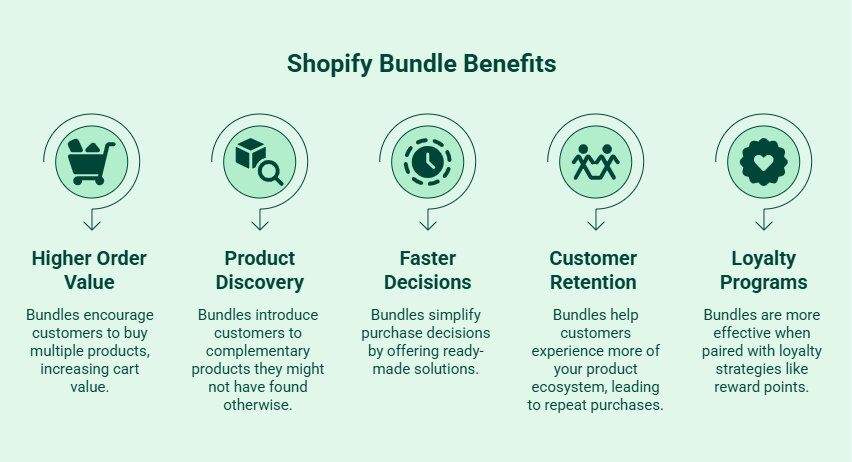
Shopify bundles do more than increase cart value. They simplify purchase decisions, improve product discovery, and help customers engage with more of your products at once. That combination can improve both short-term sales and long-term customer retention.
One of the biggest advantages of product bundling is higher cart value. Instead of purchasing a single item, shoppers buy multiple related products together at a bundled price.
Bundles also introduce customers to products they may not have explored individually. This improves visibility for complementary products across your online store without relying heavily on aggressive upselling.
Curated bundles reduce unnecessary browsing and comparison. Instead of evaluating multiple individual items, shoppers can quickly choose a ready-made solution designed around a specific need.
Bundles help customers experience more of your product ecosystem. Someone buying a skincare bundle, for example, may later reorder individual products they discovered through the set.
This works especially well for:
Bundles become even more effective when paired with loyalty strategies. Reward points, VIP-only bundles, and seasonal incentives encourage repeat purchases while adding more value to the customer experience.
Brands looking to improve repeat purchases alongside bundle strategies can also explore customer retention tools like Kefi’s Shopify loyalty and rewards solutions, especially when creating custom solutions for specific customer segments.
Shopify bundle pages can attract high-intent traffic because shoppers often search for curated product combinations before purchasing. A strong bundle page should support both SEO visibility and a smooth shopping experience.
Include relevant keywords naturally across headings, descriptions, and FAQs, such as:
Avoid unnecessary keyword repetition.
Use clear product titles and descriptive image names like:
Add meaningful alt text to help search engines understand the page.
Link bundle pages to related products, categories, gift guides, and blog content. FAQs also improve topical relevance and AEO optimization.
Customer reviews build trust and keep bundle pages fresh with user-generated content.
Well-optimized bundle pages should feel clear, searchable, and easy to navigate.
Creating Shopify bundles can help increase average order value, but long-term growth comes from getting customers to return after the first purchase.
That is where customer loyalty becomes important.
Kefi helps Shopify brands improve retention through loyalty rewards, VIP programs, referrals, and customer engagement tools designed for e-commerce stores. This works especially well alongside product bundling strategies because customers who purchase bundles are often more likely to explore additional products later.
With Kefi, you can:
For Shopify brands looking to combine higher cart value with stronger customer retention, Kefi helps create a more sustainable long-term growth strategy without overcomplicating the shopping experience.
Ready to improve customer retention and reward repeat shoppers more effectively? Install Kefi from the Shopify App Store and start building loyalty programs, VIP rewards, and referral campaigns designed to grow your Shopify store.
Creating Shopify bundles without an app is often much simpler than most merchants expect. With native Shopify features, you can build fixed bundles, offer volume discounts, improve product discovery, and increase average order value without adding unnecessary software costs.
The key is keeping your bundles clear, relevant, and easy to manage. Start with simple product combinations, test what shoppers respond to, and optimize your bundle pages for visibility and conversions. As your store grows, you can then decide whether additional functionality or automation is necessary to support scaling operations and customer retention.
You can create bundles manually by adding a new product listing that combines multiple products into one offer. Shopify’s native features like products, collections, variants, and discounts make it possible to build simple bundles without installing additional tools.
Yes. Shopify allows merchants to create automatic discounts, percentage discounts, and volume discounts directly through the admin dashboard. This helps stores promote bundle price savings without relying on third-party bundle apps or advanced plugins.
The biggest limitations involve inventory tracking, automation, and customization. Manual bundle setups can become difficult as product catalogs grow. Native Shopify functionality also offers limited support for dynamic bundles and advanced customer personalization experiences.
Inventory tracking for manual bundles usually requires regular monitoring of individual items inside the bundle. If one bundled product sells out separately, merchants may need to manually update or pause the bundle listing to avoid overselling.
Yes. Optimized bundle pages can target high-intent searches related to gift sets, starter kits, and custom bundles. Well-structured bundle pages also improve internal linking, product discovery, and organic visibility for e-commerce stores.
Yes. Merchants can manually create subscription bundles by combining products into one subscription listing using Shopify-compatible subscription tools. However, advanced subscription bundles with flexible customization may still require additional integrations or custom solutions later.
Yes. Shopify merchants can display bundled products on the same page by manually creating a dedicated bundle product listing. You can showcase included products, bundle price details, savings, and product images together without installing an additional plugin.
.svg)
