.png)
Now, lets deep dive on this.
Running discounts on a Shopify store sounds simple until profit margins start shrinking and conversion rate numbers stay flat. Many Shopify store owners lower prices too quickly, only to realize that standard discount offer campaigns do not always increase order value or repeat purchases.
That is where a Shopify BOGO sale becomes more effective. Instead of cutting prices across the entire online store, a buy x get y campaign encourages shoppers to add more products to their cart. This creates a better customer experience while helping stores boost sales more strategically.
This guide explains how to do a BOGO sale on Shopify using native buy x get y settings, automatic offers, customer tag workflows, and Shopify BOGO apps. It also covers product bundles, free gifts, common setup mistakes, and practical ways to improve cart value and campaign performance.
A Shopify BOGO sale is a buy x get y promotion in which customers receive a free item, a reduced-price product, or a percentage discount after meeting purchase conditions. Shopify store owners commonly use buy-one-get-one (BOGO) sales to increase order value, improve the customer experience, and create a sense of urgency during marketing campaigns.
Buy x, get y discounts reward customers after purchasing qualifying products. For example:
Shopify’s native buy x setup supports:
This makes Shopify BOGO promotions a popular way to increase average order value without heavily reducing prices across the entire product catalog.
Customers usually focus more on perceived value than the actual discount amount. A BOGO offer feels more rewarding because shoppers receive extra products rather than just a percentage discount.
For Shopify store owners, BOGO promotions can help:
Many Shopify store owners also use limited-time BOGO promotions to create urgency and increase sales during high-traffic shopping periods.
Shopify stores can run different types of BOGO promotions depending on pricing goals, inventory movement, and customer behavior.

These BOGO promotions work especially well for fashion stores, beauty brands, electronics retailers, and subscription-based Shopify businesses looking to boost sales without heavily reducing profit margins.
BOGO promotions work well because they make shoppers feel they are getting more value without spending significantly more. Instead of focusing only on discounts, customers focus on the extra reward, which often encourages larger cart sizes and faster purchase decisions.
For Shopify store owners, BOGO campaigns can help improve average order value, increase repeat purchases, move inventory faster, and maintain healthier profit margins compared to flat percentage discounts.
Customers are more likely to increase spending when rewards unlock after reaching a minimum quantity of items or a minimum purchase amount.
For example:
This strategy changes customer cart behavior because shoppers often add extra items to avoid missing the reward. Instead of leaving with just one product, customers increase their order value to qualify for the BOGO offer, naturally improving cart value without forcing aggressive pricing reductions.
Limited-time BOGO promotions encourage shoppers to complete purchases more quickly, rather than delaying checkout. On Shopify stores, urgency tactics often work best when combined with cart-focused messaging and visible progress toward rewards.
Many Shopify store owners use:
For example, messages like “Add one more product to unlock your free gift” or “BOGO offer ends tonight” can reduce hesitation and encourage customers to complete checkout faster.
Flat discounts apply to the entire order, while BOGO sales usually keep at least one product at full price. This helps Shopify store owners maintain healthier margins while still offering value-driven promotions.
For example:
This approach gives merchants greater control over inventory movement, reward selection, and overall campaign profitability than sitewide percentage discounts.
When structured correctly, Shopify BOGO promotions can increase cart value, improve conversion rate, and create a stronger customer experience without heavily reducing profit margins.
Shopify allows merchants to create buy x get y discounts directly in the Shopify admin using discount codes or automatic discount settings. Stores can also use Shopify BOGO apps to enable advanced workflows, such as free gifts, automatic free-item additions, product bundles, and customer-tag targeting.
Log in to your Shopify account and open the Discounts section from the Shopify admin dashboard. This area controls all active promotions, discount codes, automatic discounts, and campaign rules across your Shopify store.
Before creating a new BOGO campaign, review existing discounts to avoid overlapping offers or conflicting automatic discount settings.
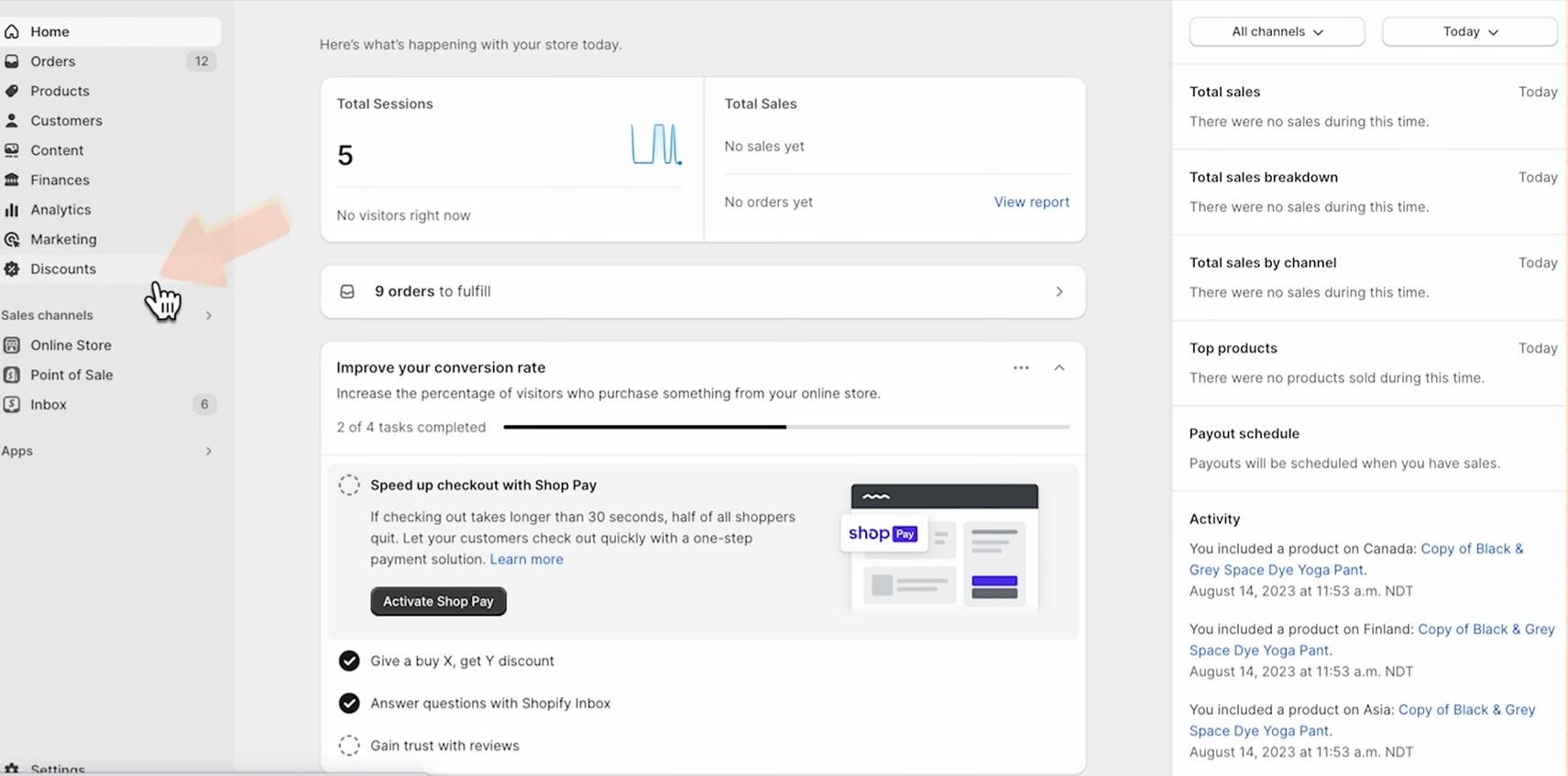
Click the “Create discount” button to begin configuring your BOGO discount.
Shopify will display multiple discount types, including:
Select the option that best matches your campaign goal. For BOGO sales, Shopify’s native buy x get y setup gives merchants more control over free items, discounted products, and reward eligibility conditions.

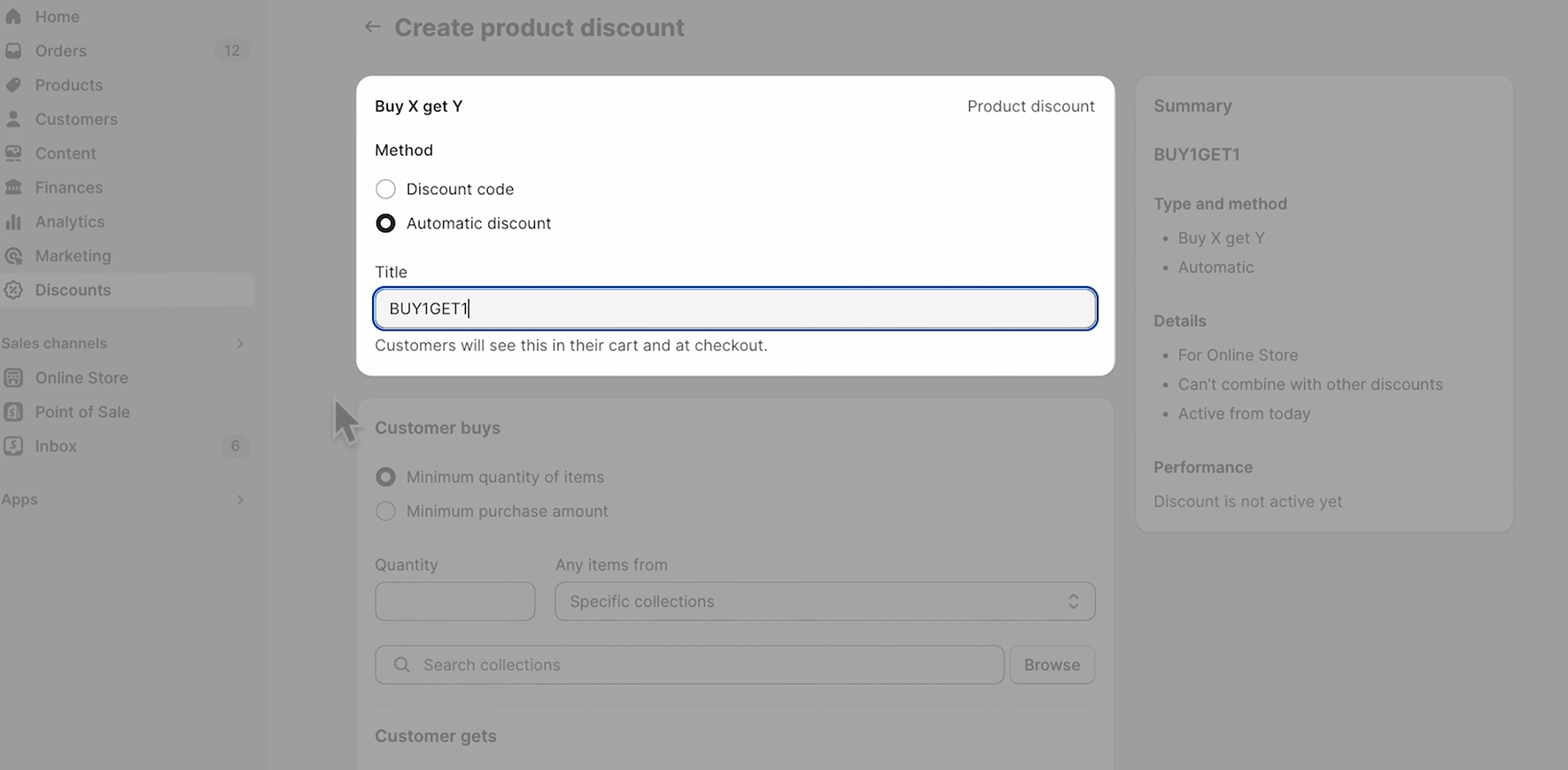
Choose the discount type labeled Buy X Get Y.
This setup supports several BOGO campaign styles, including:
For example, Shopify store owners can:
This flexibility makes BOGO promotions useful for both simple campaigns and more advanced upselling strategies.

Next, decide how customers will activate the BOGO offer during checkout.

Choose the setup that best fits your marketing campaign and checkout experience goals.
Next, configure the qualifying conditions.
Examples include:
You can also target specific customer segments or customer tag groups for more personalised marketing campaigns.
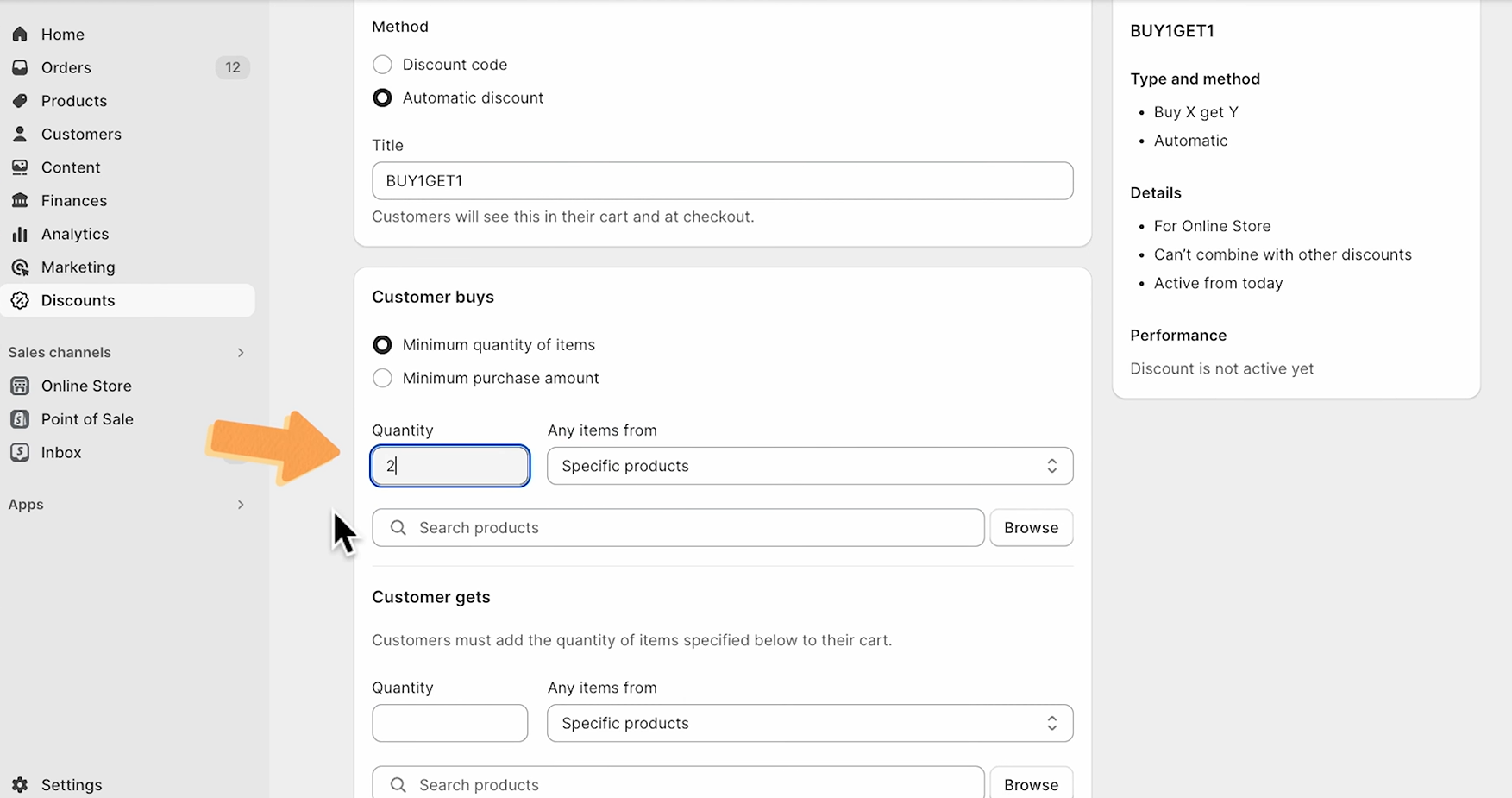
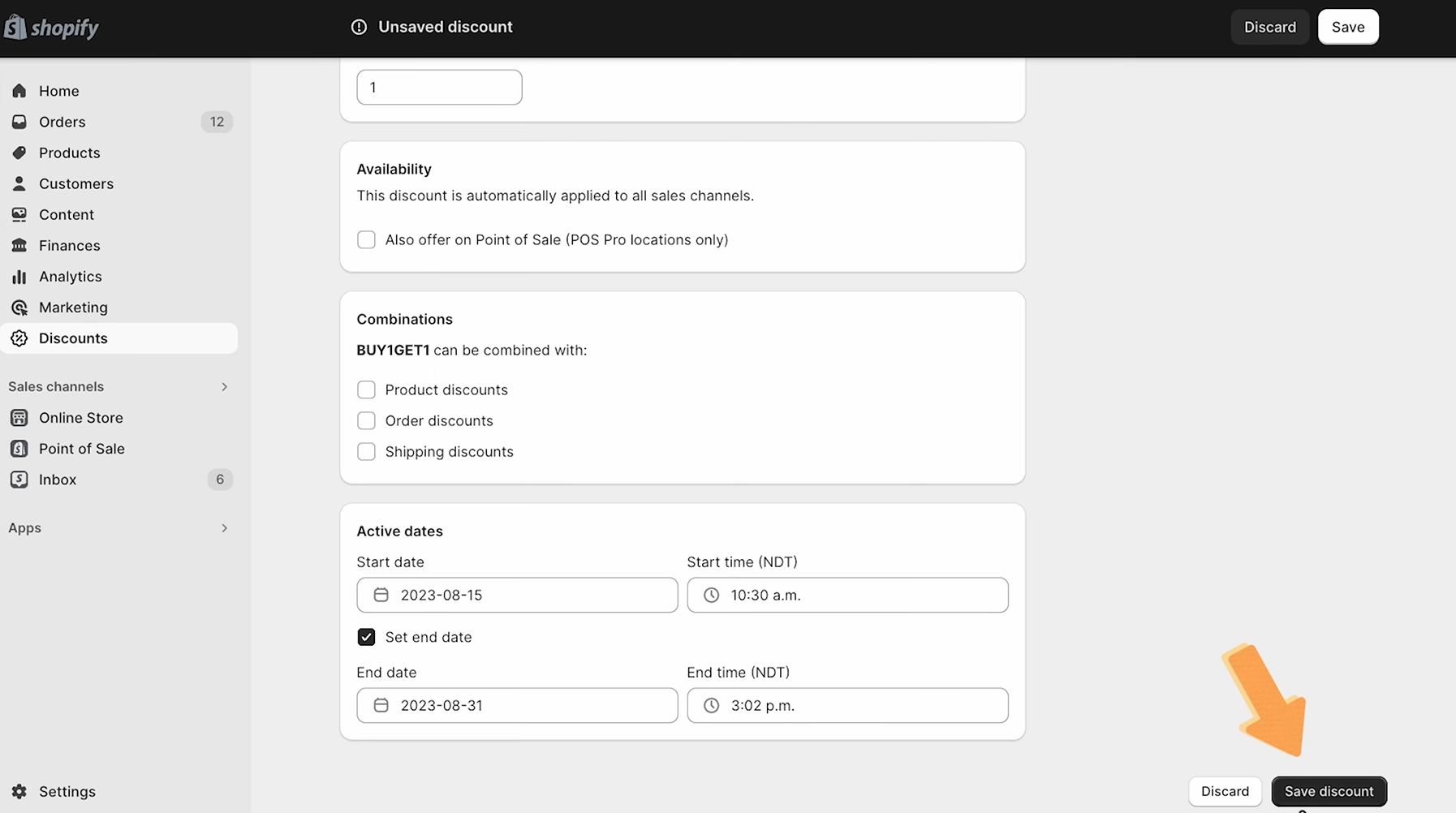
Before publishing the Shopify BOGO sale, configure:
These settings help prevent misuse and improve customer experience.
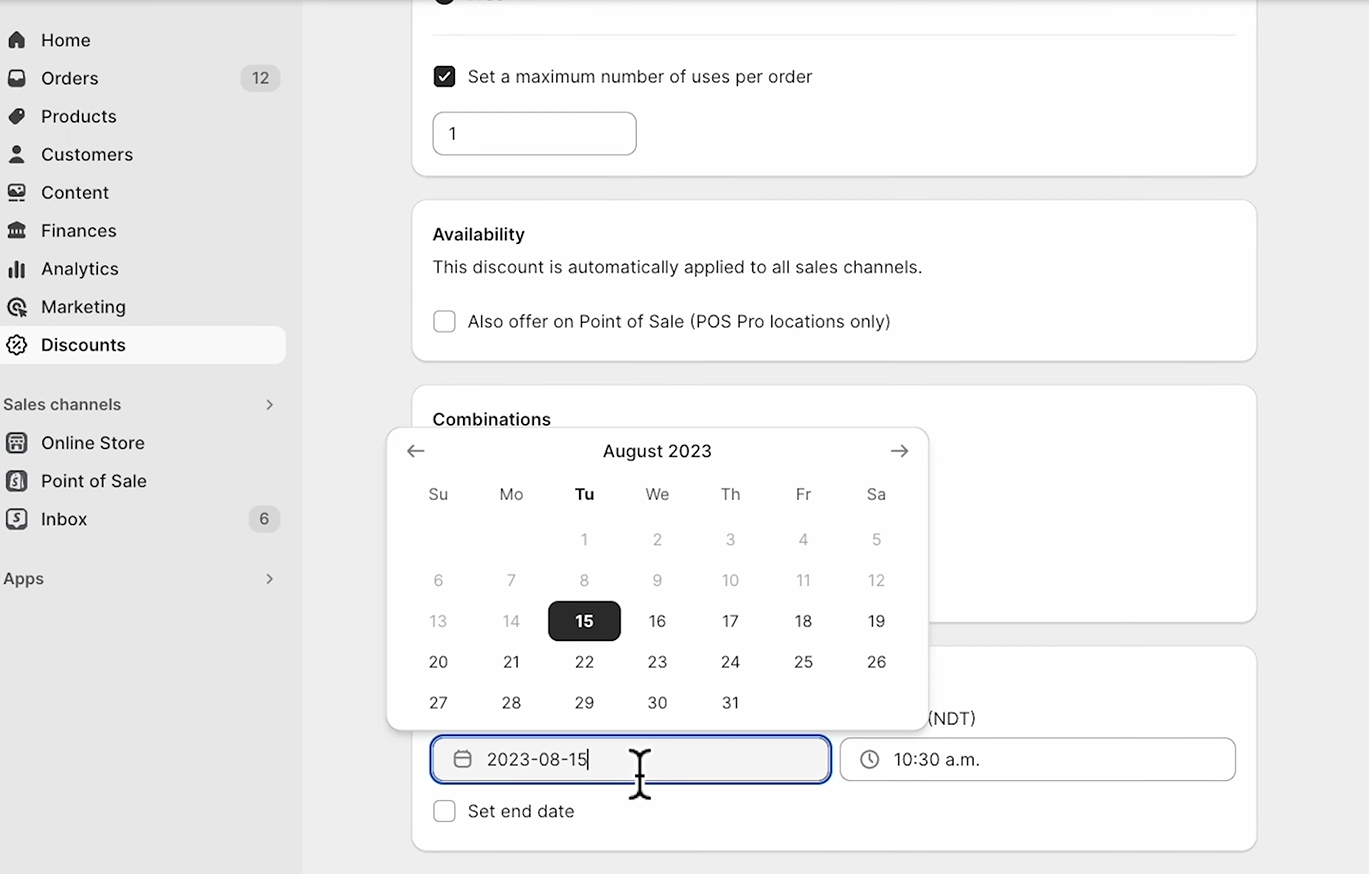
Save the campaign and test the entire customer journey.
Always confirm:
Testing helps avoid customer confusion and checkout problems.
Return to the Active discounts section inside the Shopify admin and confirm the campaign is live and displaying correctly.
Review:
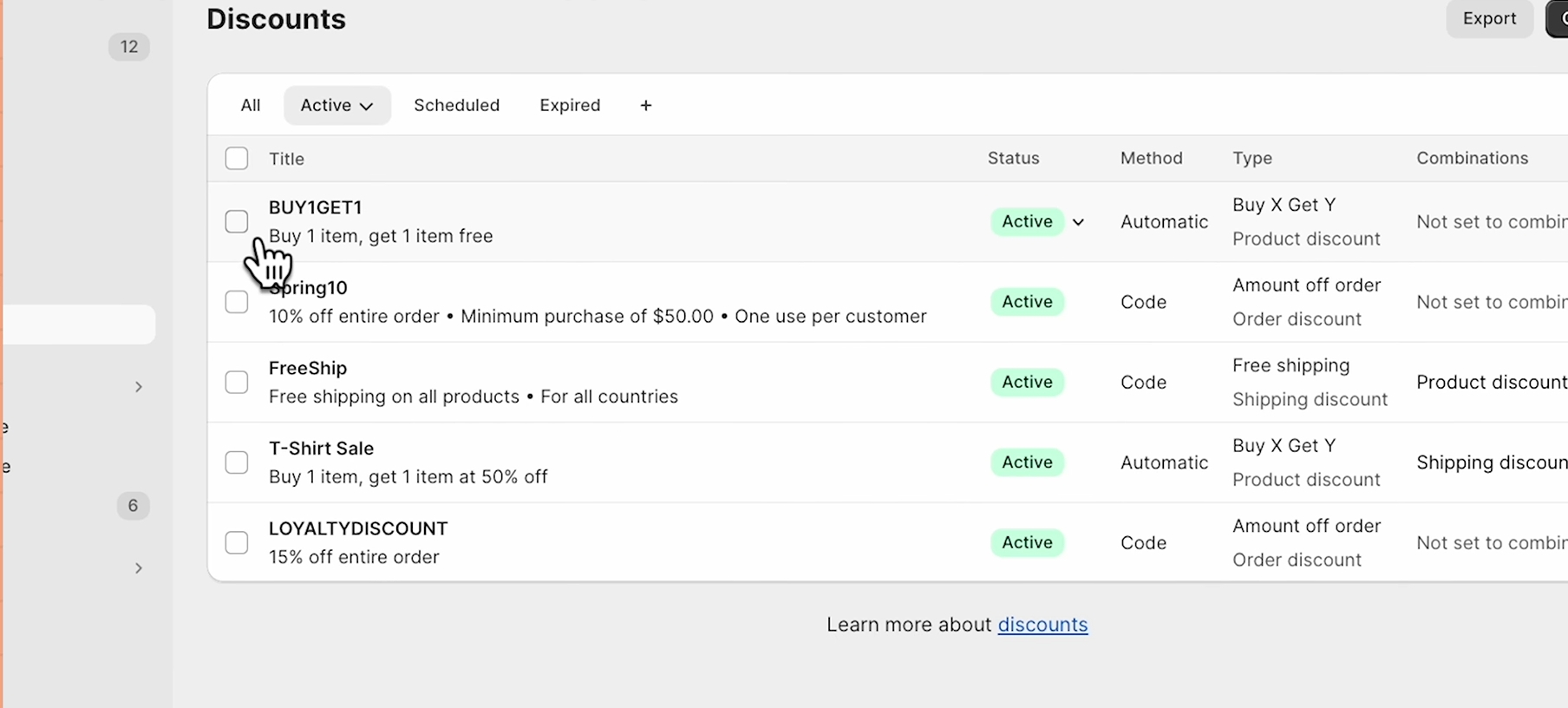
Reviewing active discounts before launch helps Shopify store owners identify setup issues, overlapping offers, and checkout conflicts early. This ensures the BOGO promotion works smoothly across the entire customer journey.
Discount code campaigns require customers to manually enter a code during checkout, while automatic discount promotions apply instantly when cart conditions are met. Automatic discounts usually create a smoother customer experience and help reduce checkout friction during Shopify BOGO sales.
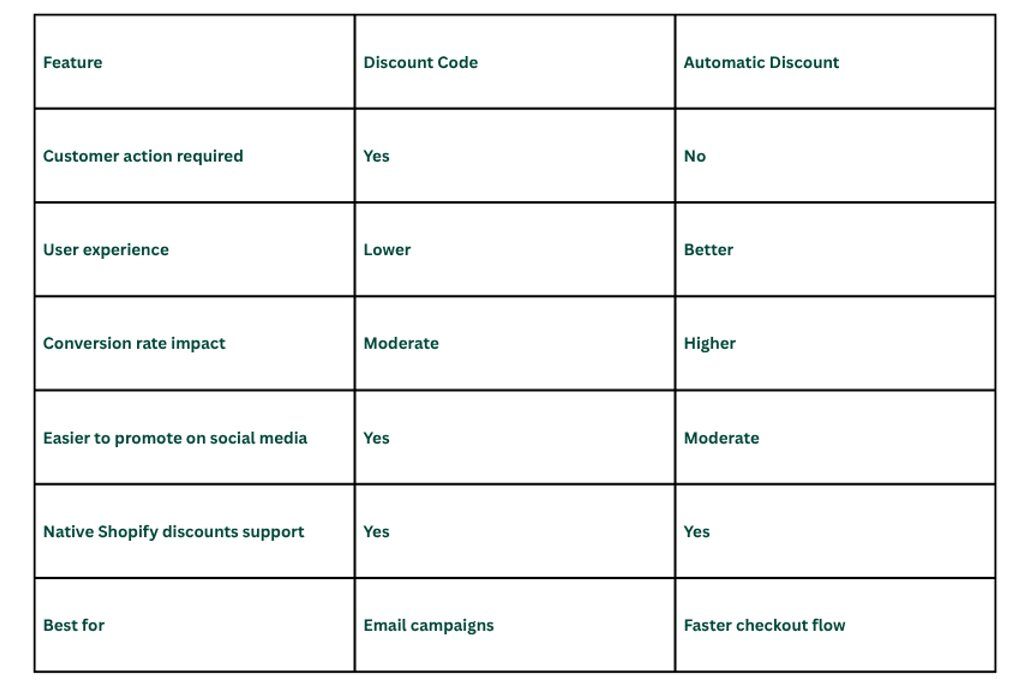
Many Shopify store owners prefer automatic discount campaigns because they reduce friction during checkout.
Shopify’s native buy x get y setup works well for basic BOGO promotions, but many Shopify store owners eventually need more flexibility as campaigns become more advanced. Limitations around automatic free gifts, discount combinations, bundle logic, and cart-level customization often make it harder to scale complex promotions efficiently.
In many Shopify BOGO setups, customers still need to add the free item manually for the discount to apply correctly. This can create confusion during checkout, especially when the reward conditions are not clearly explained on the product page or cart drawer.
As a result, some Shopify store owners use Shopify BOGO apps that automatically add free gifts to improve customer experience and reduce checkout friction.
Native Shopify discounts support simple buy x get y offers, but they are not designed for more advanced bundle workflows.
Stores running:
Often need additional Shopify BOGO apps for better flexibility and cart customization.
As product catalogs and marketing campaigns grow, merchants usually need more control over how products, rewards, and upsells work together during checkout.
Shopify has improved discount combinations over time, but some campaign setups can still become difficult when multiple promotions run together.
For example, Shopify store owners may face challenges when combining:
Without careful configuration, overlapping promotions can create checkout conflicts or unintentionally reduce profit margins.
Many Shopify merchants eventually outgrow native discounts because they want more conversion-focused features directly inside the shopping experience.
Examples include:
For more advanced workflows, many merchants use apps like Kefi Commerce to create automatic free gifts, product bundles, and advanced discount rules without relying entirely on native Shopify discounts.
Some Shopify BOGO apps only handle free gifts or discounts. Others combine bundles, upsells, cart rewards, and post-purchase offers in one platform.
For merchants wanting the widest verified feature set in a single app, Kefi Commerce is the strongest option. It supports BOGO/BXGY offers, free gifts, mix-and-match bundles, BYOB bundles, volume discounts, AI slide-cart upsells, milestones, and post-purchase offers from one app.
Other apps are more focused:
For stores trying to reduce app stacking, Kefi offers the broadest all-in-one setup.
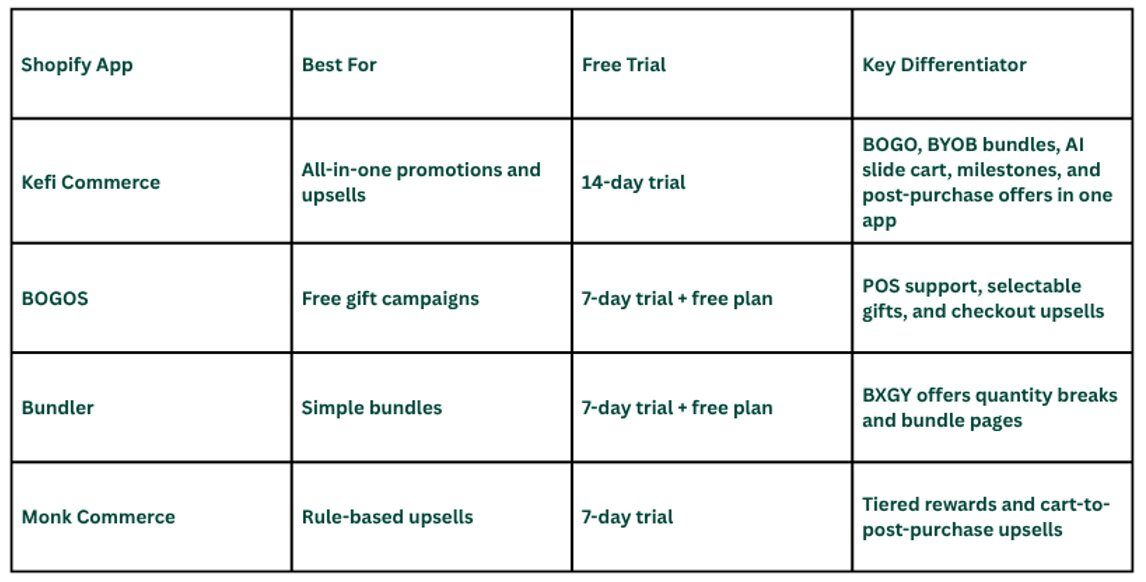
For merchants running multiple promotions, using one app with bundles, upsells, and BOGO features can simplify campaign management. Among the verified options above, Kefi Commerce offers the broadest all-in-one promotion setup.
Many Shopify BOGO sales fail because of poor user experience, inventory problems, unclear discount type settings, or confusing free promotion messaging. Testing the entire customer journey before launching helps improve customer experience and conversion rate.
Common reasons include:
Always test the BOGO deal before launching publicly.
Poorly configured get y discounts can damage profit margins.
Examples include:
Careful testing helps maintain healthier margins.
Many issues only appear during checkout.
Shopify store owners should test:
A well-tested Shopify BOGO sale creates a smoother customer experience, protects profit margins, and improves conversion rate. Reviewing discount logic, checkout behaviour, and reward settings before launch helps prevent costly campaign mistakes later.
Basic Shopify discounts work for simple offers, but larger campaigns often need more flexibility, targeting, and upselling tools. Kefi Commerce helps Shopify merchants create conversion-focused Shopify BOGO sale campaigns while improving average order value and customer experience from one platform.
With Kefi Commerce, Shopify merchants can:
This works especially well for Shopify stores running seasonal promotions, bundle campaigns, free gift offers, and advanced upselling strategies. Instead of managing multiple Shopify apps separately, Kefi Commerce helps merchants simplify bogo promotions and improve cart conversion more efficiently.
Looking to improve your Shopify BOGO sale strategy? Explore Kefi Commerce on the Shopify App Store and create more flexible bogo promotions, product bundles, and upsell campaigns for your Shopify store.
A Shopify BOGO sale can help increase average order value, improve customer experience, and boost sales when configured correctly. Shopify’s native buy x get y discounts work well for basic campaigns, while advanced Shopify BOGO apps provide more flexibility for free gifts, product bundles, volume discounts, and targeted customer segments.
The next step is choosing the right BOGO strategy based on your products, pricing goals, and customer behaviour. Start with a simple offer, test the customer experience across desktop and mobile devices, and optimise your discount rules over time to improve conversion rate and long-term campaign performance.
Shopify's native buy x setup usually requires customers to manually add the free item before the discount applies. Many Shopify BOGO apps support automatic free gift workflows, helping Shopify store owners improve customer experience and reduce checkout friction during promotions.
Yes. Shopify store owners can create a Shopify BOGO sale directly inside the Shopify admin using native buy x get y discounts. This works well for basic discount codes and automatic discount campaigns without needing additional Shopify BOGO apps or custom coding.
When configuring buy x get y discounts, Shopify allows merchants to choose different products or collections as qualifying items and rewards. This helps Shopify store owners create more flexible product bundles, free gifts, and advanced BOGO promotions across their online store.
Yes. Many Shopify BOGO apps support customer tag workflows that help merchants target specific customer segments, loyal customers, wholesale buyers, or repeat purchase campaigns. This creates more personalized BOGO promotions and improves customer experience across the Shopify store.
The best Shopify app depends on campaign goals and store requirements. Some Shopify store owners need simple free gifts. In contrast, others prefer advanced features like product bundles, volume discounts, customer tag targeting, slide-cart upsells, and automatic discount workflows for larger campaigns.
Yes. A Shopify BOGO sale encourages customers to purchase more products in a single order to unlock rewards, such as free gifts or discounted items. This often increases average order value while helping Shopify store owners naturally boost sales and conversion rates.
Some native Shopify discounts support combinations, but restrictions depend on the discount type, checkout setup, and active campaigns. Shopify store owners should always test discount combinations carefully to avoid conflicts that may affect customer experience or automatic discount functionality.
Automatic discount campaigns apply rewards instantly when cart conditions are met, while discount code offers require customers to enter the code manually during checkout. Automatic discounts usually provide a smoother user experience and can help improve conversion rate during BOGO sales.
A basic Shopify BOGO sale with native buy x get y discounts usually takes about 10–20 minutes to set up in the Shopify admin. More advanced BOGO promotions with free gifts, product bundles, or customer-tag targeting may take longer, depending on the campaign's complexity.
Shopify's native buy x get y discounts usually require customers to add the free item to the cart manually. To auto-add free gifts, many Shopify store owners use Shopify BOGO apps that support automatic discount workflows and cart-based promotions.
.svg)
