Optimizing your bundle offers and designs is key to increasing conversion rates and average order value (AOV). With Kefi’s A/B Testing feature, you can run experiments by creating multiple variants of the same bundle to test different designs, layouts, or content setups. By tracking performance metrics in real time, you can confidently declare a winning variant based on customer behavior.
Availability & Eligibility
Plan Requirement: The A/B Testing feature is available exclusively on the Unlimited Plan.
Supported Bundle Types: A/B testing can currently be used with two specific bundle types:
Quantity Breaks / Volume Discount Bundle
Build Your Own Box (Bundle Builder)
What is A/B Testing and How Does It Help?
What is A/B Testing?
A/B testing (split testing) allows you to split traffic between different variations of a single bundle offer. Each visitor sees one of the created variants, allowing you to measure performance across different designs or offer configurations.
Key Benefits
Data-Driven Decisions: Eliminate guesswork by seeing which bundle variations convert best.
Increased Conversions & Sales: Fine-tune layout, text, or discount structures to encourage higher conversions.
Maximized Revenue & AOV: Identify high-performing designs that encourage larger box sizes or higher bundle purchases.
Risk-Free Experimentation: Test new concepts on live traffic and pick a winner at any time without losing store progress.
How to Enable & Configure A/B Testing
Step 1: Open Your Bundle Editor
Go to your Kefi dashboard and open or create a supported bundle (Quantity Breaks or Build Your Own Box).
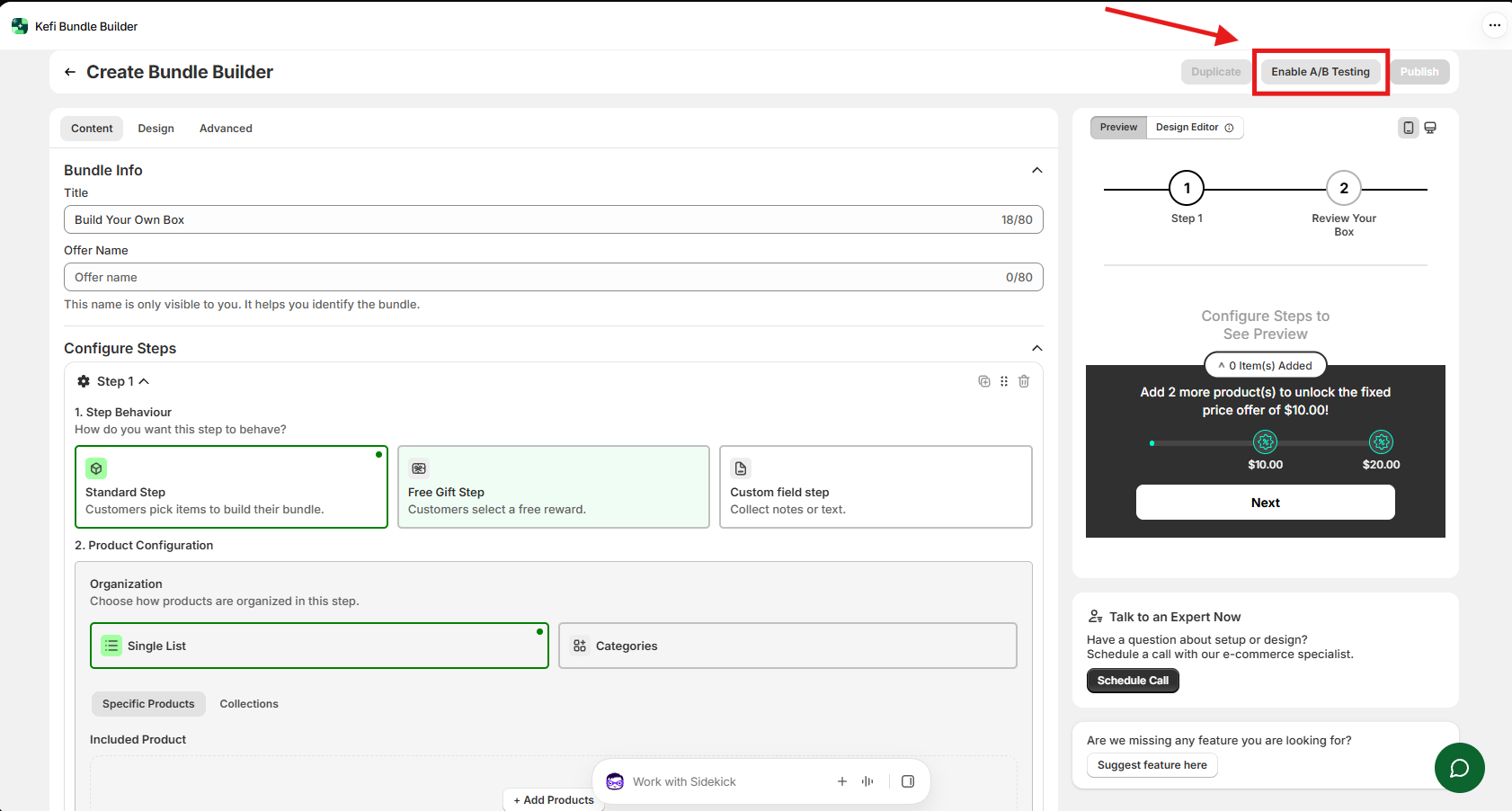
In the top right corner of the bundle creation/edit page, click the Enable A/B Testing button.
Step 2: Create Your Variants
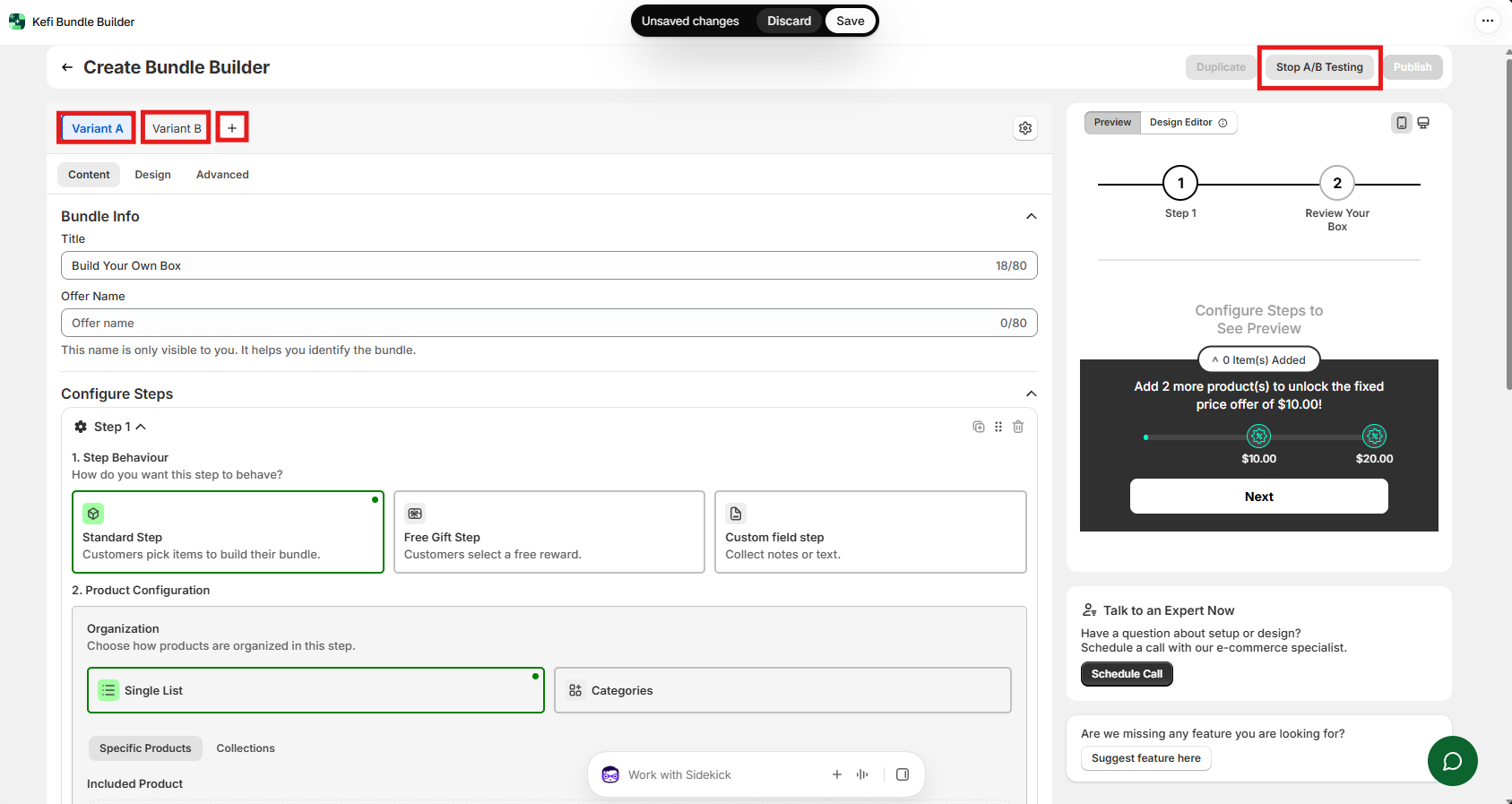
Once enabled, you will see variant tabs above the configuration section (e.g., Variant A, Variant B).
Add Variants: Click the + icon next to the variant tabs. You can create up to 4 variants for a single test.
Customize Each Variant: Switch between the tabs (Variant A, Variant B, etc.) and adjust the Content, Design, or Advanced settings for each variant.
Click Save or Publish once your variants are configured.
Note: To stop testing at any point while editing, click the Stop A/B Testing button at the top right.
How to Track Performance & Choose a Winner
You can monitor performance and select a winning design directly from the A/B Tests section on your app menu.
Step 1: Access the A/B Tests Dashboard
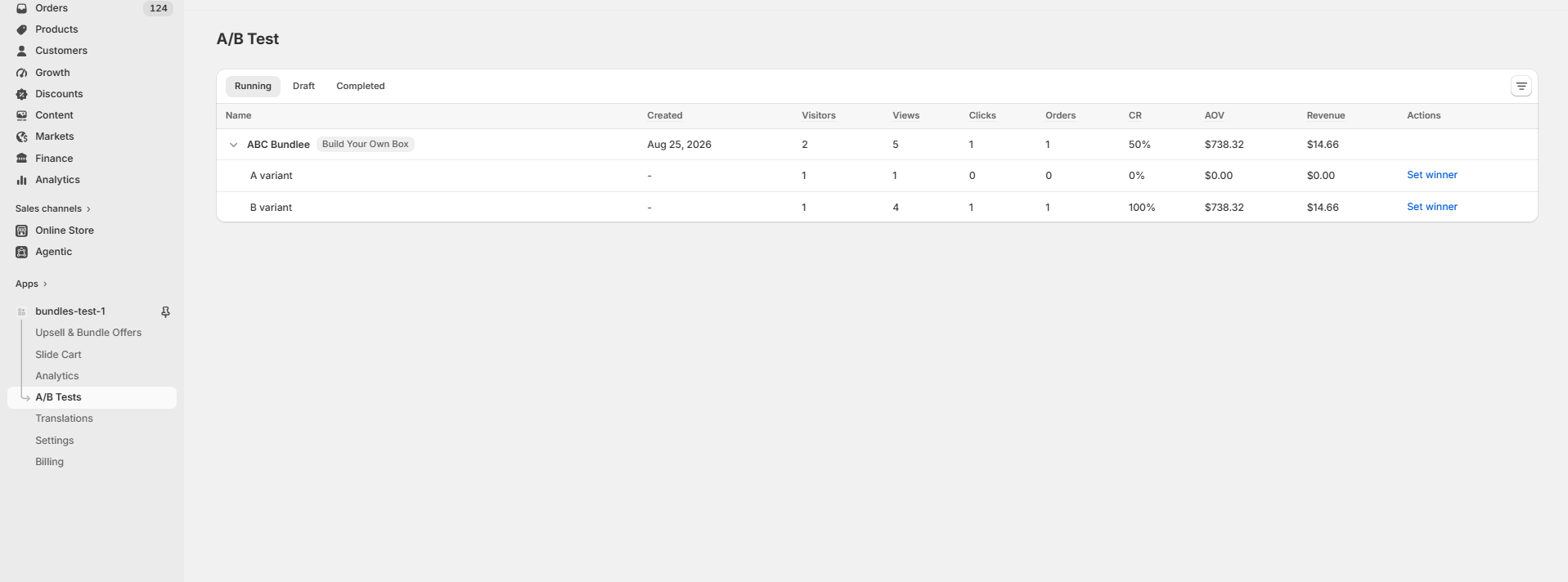
In the left sidebar menu under your app, navigate to A/B Tests. Here, tests are organized across three tabs:
Running: Active tests currently being displayed to store visitors.
Draft: Tests being configured or not yet published.
Completed: Tests that have concluded and have a designated winning variant.
Step 2: Analyze Key Performance Metrics
Click on any running test to expand its variant performance metrics:
Visitors: Number of unique store visitors who were shown the variant.
Views: Total number of times the variant was viewed.
Clicks: Total interactions or clicks recorded on the variant.
Orders: Number of completed orders generated by the variant.
CR (Conversion Rate): Percentage of visitors who completed an order.
AOV (Average Order Value): Average revenue earned per order for that variant.
Revenue: Total revenue generated by the variant.
Step 3: Select and Set a Winner
Review the conversion rate (CR), revenue, and orders to determine which variant performed best.
Click Set winner next to the highest-performing variant.
Once a winner is set, the losing variants are deactivated, and all future store traffic will automatically be directed to the winning variant.
Frequently Asked Questions (FAQ)
Q: Can I run an A/B test on lower plans?
A/B testing is exclusive to the Unlimited Plan. To access this feature, upgrade your plan via the Billing section.
Q: How many variants can I test simultaneously?
You can create and test up to 4 variants per bundle experiment.