What is the Best Color Swatch App on Shopify to Boost Sales?

Best Color Swatch App on Shopify

Key Highlights

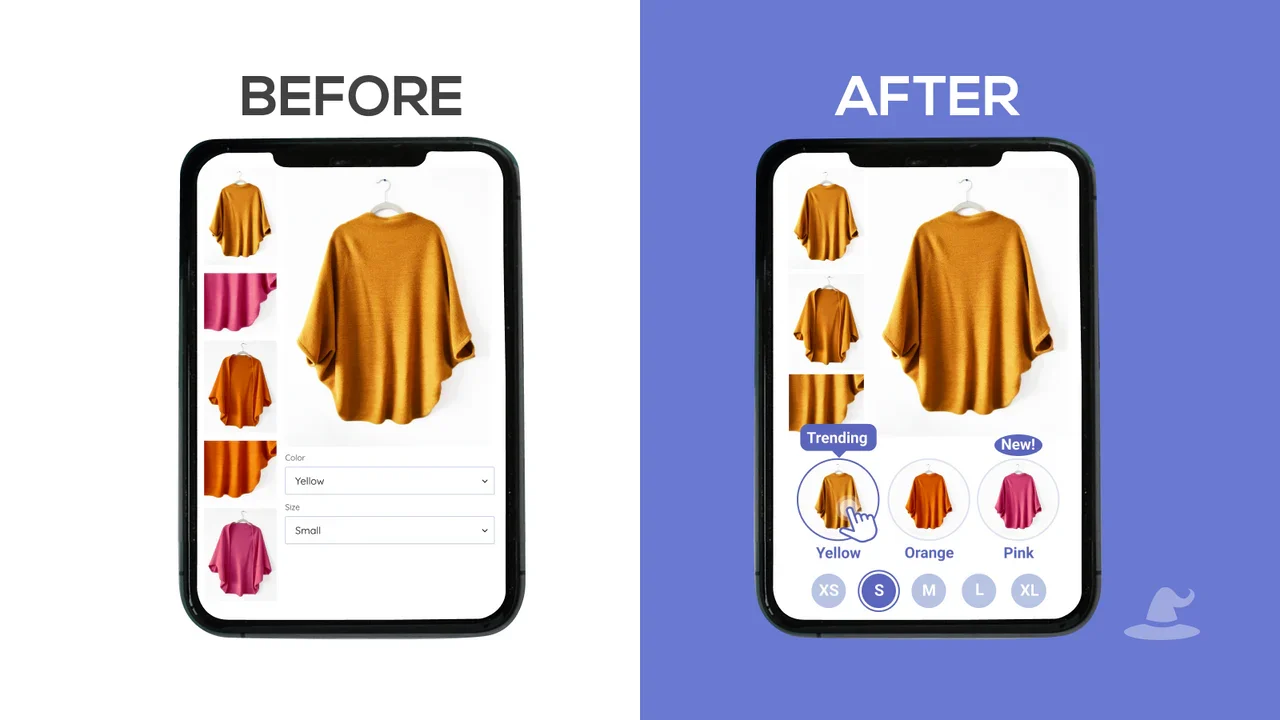
  • A color swatch app transforms your Shopify store's product variants from text-based dropdowns into visual, clickable swatches.
  • Using customizable swatches for colors and textures significantly enhances product visualization and improves the user experience.
  • These apps simplify the selection of product variants, leading to increased buyer confidence and better conversion rates.
  • Key features to look for include theme compatibility, mobile responsiveness, bulk editing, and support for custom image swatches.
  • Implementing the right color swatch app creates a more professional, branded appearance, helping to boost sales.
  • Apps like Colour Swatch King and GLO Color Swatch & Bundles offer robust features to improve your product pages.

In the competitive world of e-commerce, product presentation plays a crucial role in driving conversions. Many Shopify stores still rely on basic dropdown menus for product variants, which often fail to deliver a visually engaging and intuitive shopping experience. This can lead to confusion, reduced engagement, and missed sales opportunities, especially when customers want to explore different colors or styles quickly.

The goal is to create a more seamless and visually appealing shopping journey that helps customers make faster and more confident decisions. By replacing traditional dropdowns with interactive color swatches, brands can showcase product variations more effectively, improve user experience, and ultimately boost conversions.

In this guide, we will walk you through choosing the right color swatch app for your Shopify store. You will learn which features to look for, how to enhance product presentation, and how the right solution can transform your store into a more engaging, conversion-focused experience.

What is a Color Swatch App?

A color swatch app is a powerful Shopify tool that replaces traditional, text-based dropdown menus for product variants with interactive, visual buttons. Instead of customers having to read a list of colors like “Red” or “Blue,” they see clickable product swatches that represent the actual color, pattern, or texture. When a customer clicks a swatch, the main product image instantly updates to show that specific variation.

This simple change fundamentally improves how shoppers interact with your variant options. It makes browsing through different styles more intuitive and engaging, and many modern tools like Kefi Swatch Options even combine visual swatches with flexible variant customization to create a smoother shopping flow. For any store selling items with multiple visual product variants, a color swatch app is essential for creating a clear, user-friendly, and modern shopping experience that helps customers make decisions more quickly and confidently.

What are the Key Benefits of Using a Color Swatch App on Shopify?

Key Benefits of Using a Color Swatch App on Shopify

Integrating a color swatch app into your Shopify store offers significant advantages that directly impact your bottom line. By providing a superior user experience, these apps help you display product variants more effectively, which in turn can boost sales and build customer trust.

Let's explore the specific benefits in more detail.

1. Enhances Product Visualization and User Experience

Color swatch apps transform how customers interact with your products by replacing plain text options with intuitive, clickable visuals. This makes it easier for shoppers to instantly understand product variations and compare options without friction. A smoother browsing experience builds trust and encourages deeper engagement. Solutions like Kefi Swatch Options further enhance this by offering highly customizable swatches that align perfectly with your store’s design, making the overall experience feel seamless and premium.

2. Improves Conversion Rates and Purchase Confidence

When customers can clearly see what they are buying, their confidence naturally increases. Color swatches remove uncertainty by providing an accurate visual representation of product variants, reducing hesitation and cart abandonment. This clarity plays a key role in improving conversions and driving more sales. With tools like Kefi Swatch Options, you can create a more transparent and reliable shopping journey that helps customers make faster, more confident purchase decisions.

3. Simplifies Product Variant Selection

Selecting product variants becomes quick and effortless with color swatches. Instead of navigating long dropdown menus, customers can simply click on the option they prefer and instantly see the updated product image. This reduces confusion and speeds up the decision-making process, creating a more user-friendly experience. Kefi Swatch Options makes this even smoother with easy setup and intuitive functionality, helping you turn complex product pages into clean, easy-to-navigate interfaces.

4. Creates a More Professional and Branded Store Appearance

A well-designed store leaves a lasting impression, and color swatches play a big role in elevating your overall look. Replacing default dropdowns with customizable swatches makes your store appear more modern, polished, and aligned with your brand identity. From shapes to styles, every detail contributes to a cohesive design experience. With Kefi Swatch Options, you can fully customize swatches so they not only function well but also enhance your brand’s visual appeal and professionalism.

Also Read: How Metalbird drove consistent growth across 8 stores.

What are the Best Shopify Color Swatch Apps to Boost Your Sales?

Choosing the best Shopify Swatches App is crucial for transforming your product listings and driving sales. The right tool can enhance your product pages, improve the shopping experience, and ultimately help you boost sales by making it easier for customers to find and purchase exactly what they want.

Let's look at the best options available.

1. Kefi Swatch Options

Kefi Swatch Options

Source: Kefi Swatch Options

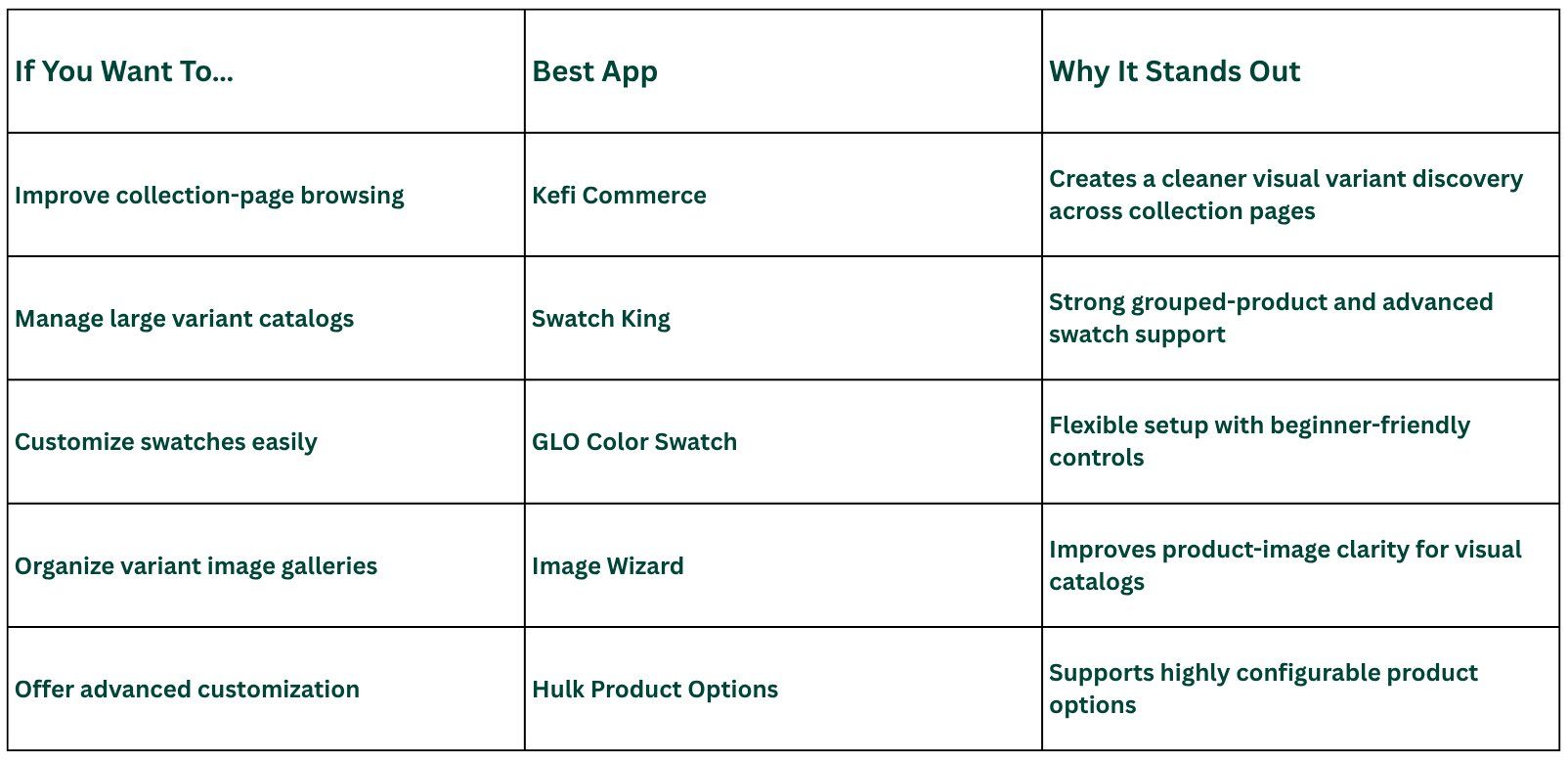
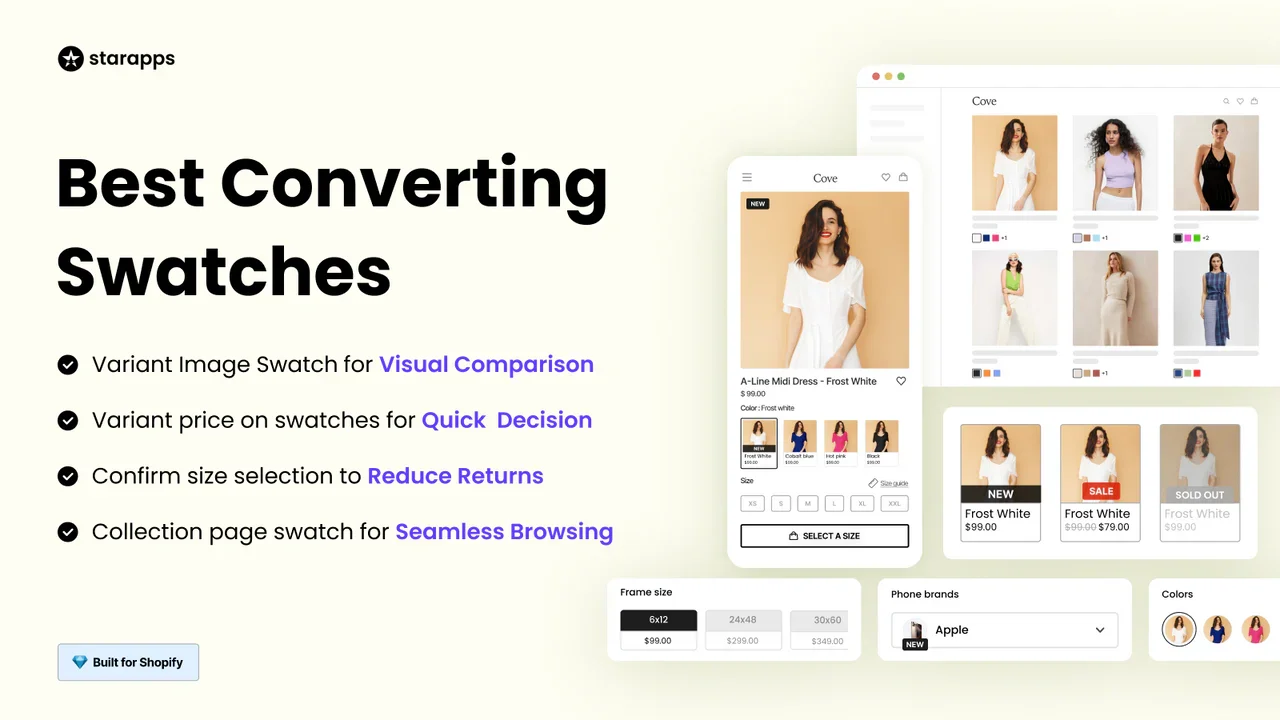
Kefi Swatch Options provides a comprehensive solution for displaying product variants in a visually appealing and highly functional way. It is designed for merchants who need powerful customization and an easy setup process. The app lets you replace standard dropdowns with attractive, customizable swatches for colors, images, and buttons. One of the standout key features is its flexibility. You can create swatch options that perfectly match your brand's aesthetic. Strong customer support and a user-friendly interface make it a top choice for store owners who want to enhance the customer journey without technical headaches.

What are the Key Features of Kefi Swatch Options?

  • Customizable Swatches: You can create color, image, and button swatches that perfectly align with your store’s branding and design.
  • Collection Page Swatches: The app allows you to display variant options directly on collection pages, making browsing faster and more intuitive.
  • Bulk Management: You can apply and manage swatch settings across multiple products at once, saving time and effort.
  • Out-of-Stock Styling: The system automatically hides or visually marks unavailable variants to avoid customer confusion.
  • Conversion-Focused Design: It enhances not just the look but also the usability of the product selection process, improving overall conversion rates.

Who is Kefi Swatch Options Best Suited For?

  • Conversion-Focused Brands: Ideal for stores aiming to improve both user experience and sales performance.
  • Multi-Variant Stores: Best suited for businesses managing products with multiple colors, styles, or variations.
  • Growth-Oriented Merchants: Works well for brands looking to combine design improvements with revenue impact.

Are Kefi Swatch Options Worth Using?

Kefi stands out by combining visual merchandising with a conversion-driven approach. It improves how customers interact with products, not just how variants are displayed. This makes it especially valuable for brands that want measurable business impact. Compared to basic swatch tools, it offers a more strategic advantage.

How Much Do Kefi Swatch Options Cost?

• Free Plan – $0/month: Includes full access to visual variant swatches (color, image, and buttons), customizable styles, and display on product and collection pages.

2. Swatchify - Color Swatches

Swatchify Swatchify

Source: Swatchify

Swatchify is an excellent choice for merchants who prioritize easy integration and a visually attractive design. This app simplifies the process of converting your product option dropdowns into customizable color swatches, requiring no coding knowledge for installation. It is designed to work seamlessly with your existing theme. The app provides a range of preset themes for your swatches, but it also supports custom CSS for those who want complete control over the design.

You can easily adjust the swatch appearance on your product page to ensure it aligns perfectly with your brand’s look and feel. For store owners seeking a straightforward solution that delivers an immediate aesthetic upgrade, Swatchify strikes a great balance between simplicity and design flexibility. Its focus on providing an attractive and user-friendly experience makes it one of the best apps for enhancing your store's design.

What are the Key Features of Swatchify?

  • Dropdown Replacement: The app converts standard dropdown menus into color, image, or text swatches for better visual selection.
  • Multi-Page Display: It enables swatches to appear across product, collection, and homepage sections for a consistent experience.
  • Auto Variant Switching: The product image updates automatically when a customer selects a different variant.
  • Stock Visibility Control: It hides or disables out-of-stock variants to prevent a poor user experience.
  • Custom Styling Options: You can customize swatch appearance to match your store’s branding.

Who is Swatchify Best Suited For?

  • Beginner-Friendly Stores: Ideal for merchants seeking a quick, easy setup without coding.
  • Design-Focused Brands: Suitable for stores aiming to improve product page aesthetics.
  • Small to Mid-Sized Stores: Works best for businesses with moderate catalog complexity.

Is Swatchify Worth Using?

Swatchify is a great option for merchants who want a simple and quick visual upgrade. It improves product presentation effectively without adding complexity. However, it focuses mainly on design rather than deeper conversion optimization. For brands looking to go beyond UI improvements, Kefi offers more strategic value.

How Much Does Swatchify Cost?

  • Free Plan – $0/month: Includes support for up to 10 product variants, multiple variant styles, and display across different pages.
  • Basic – $5.99/month: Unlimited product variants, multiple variant styles, and display across different pages with a 3-day free trial.

3. Color Swatch King: Variants

Colour Swatch King

Source: Color Swatch King

Color Swatch King is designed to be a complete solution for managing and displaying product variants. This app excels at simplifying the shopping experience by replacing dropdown menus with clean, visual swatches for all your variant options, including colors, sizes, and styles. A key strength of Swatch King is its ability to showcase product variants effectively on both product and collection pages. Customers can easily pick their desired option by color or image without leaving the main catalog.

This streamlined process makes it the right app for stores with large inventories and multiple product variations. Additionally, Colour Swatch King offers powerful features like bulk swatch uploads via CSV and automatic hiding of out-of-stock variants. These tools save you time and prevent customer frustration, making it a top contender for any merchant looking to improve variant selection.

What are the Key Features of Color Swatch King?

  • Advanced Variant Display: The app displays swatches across both product and collection pages for a seamless experience.
  • Bulk Upload Support: It allows you to upload and manage swatches using CSV files, which is useful for large catalogs.
  • Variant Linking: You can link related products and present them as variants under a single product view.
  • Stock Management: The app automatically hides or styles unavailable variants to improve usability.
  • High Customization: It offers multiple swatch formats and layout options to match different store needs.

Who is Color Swatch King Best Suited For?

  • Large Inventory Stores: Ideal for businesses managing a high volume of SKUs.
  • Operational Efficiency Focus: Best for merchants needing bulk editing and automation.
  • Advanced Shopify Users: Suitable for those comfortable handling complex configurations.

Is Color Swatch King Worth Using?

Swatch King is a powerful solution for stores that require scalability and flexibility. It performs exceptionally well for bulk operations and complex catalogs. However, it may feel overwhelming for smaller businesses. For brands prioritizing ease of use and conversion impact, Kefi offers a more streamlined approach.

How Much Does Color Swatch King Cost?

  • Free Plan – $0/month: Available for Shopify partners, staff, and trial stores with full access during development and testing phases.
  • Basic (Pay-As-You-Grow) – Starts at $5/month: Pricing scales based on your Shopify plan and includes variant swatches, collection page swatches, bulk upload, customization, and automation features.
  • Shopify Basic – $14.90/month: Includes all swatch features with support for growing stores and higher usage needs.
  • Shopify Grow & Custom – $29.90/month: Advanced usage tier with expanded capabilities for scaling brands and more complex variant setups.
  • Shopify Advanced – $49.90/month: Designed for high-volume stores with full access to all swatch, automation, and customization features.
  • Shopify Plus – $99.90/month: Enterprise-level plan with maximum scalability, performance, and priority-level usage.

4. GLO Color Swatch & Bundles

GLO Color Swatch & Bundles

Source: GLO Color Swatch & Bundles

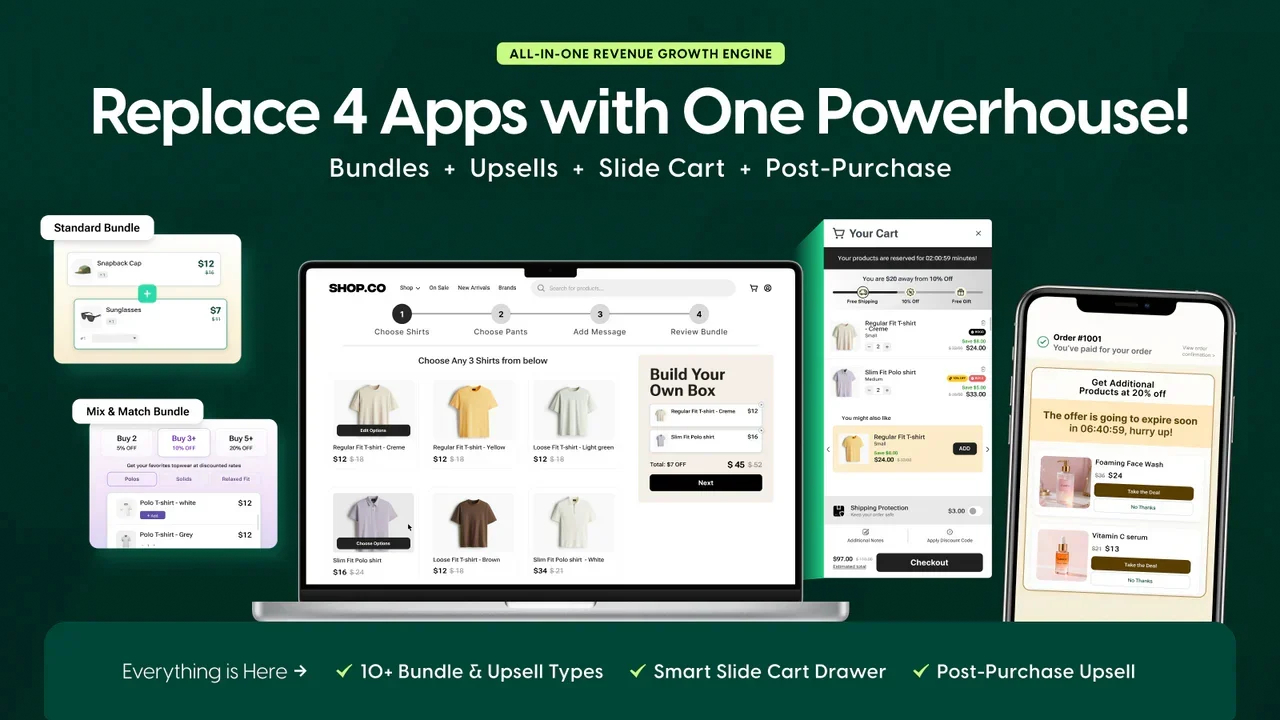
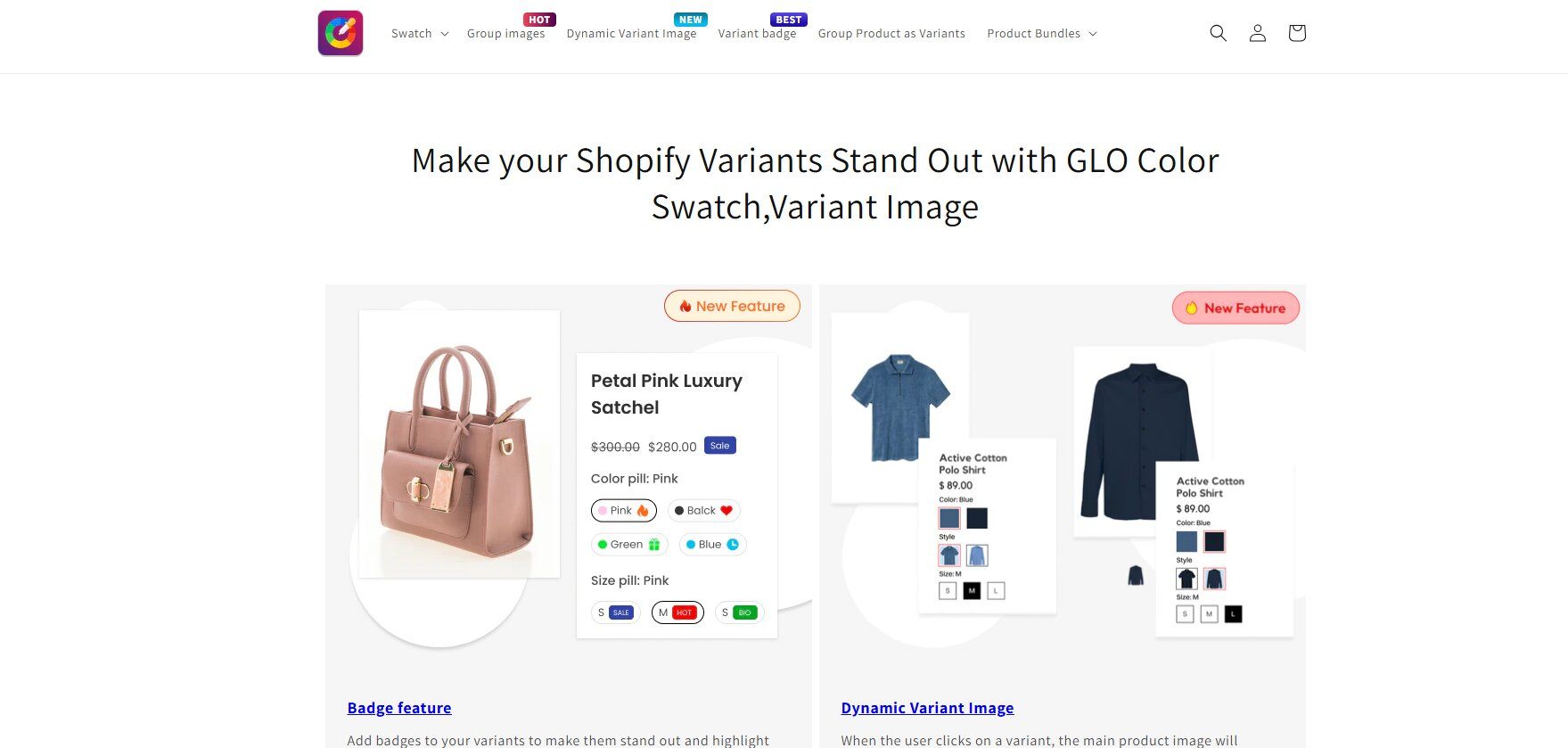
GLO Color Swatch & Bundles stands out by combining visual swatch options with powerful sales-boosting features. In addition to displaying color and image swatches on your product and collection pages, this app allows you to create and promote product bundles. This dual functionality makes GLO Color Swatch an excellent choice for merchants looking to increase their average order value. You can use it to group related products or offer combo deals, encouraging customers to purchase more in a single transaction.

The swatch options are fully customizable, supporting a variety of styles to match your store’s design. If your strategy involves upselling and cross-selling, this app is a perfect fit. It effectively merges the aesthetic enhancement of swatches with the commercial benefits of product bundles, making it a versatile tool for driving revenue.

What are the Key Features of GLO Color Swatch & Bundles?

  • Color and Image Swatches: The app enables visual selection of variants across product and collection pages.
  • Product Bundles: It allows you to create bundled offers that encourage customers to purchase more items together.
  • Quantity Breaks: You can offer discounts based on purchase quantity to increase order value.
  • Variant Grouping: The app groups related products to improve discovery and navigation.
  • No-Code Setup: It integrates easily with Shopify themes without requiring technical expertise.

Who is GLO Best Suited For?

  • Upsell-Focused Brands: Ideal for stores aiming to increase average order value.
  • Growth-Stage Businesses: Suitable for merchants scaling their revenue strategies.
  • Marketing-Driven Stores: Work well for brands that leverage promotions and bundles.

Is GLO Worth Using?

GLO is a strong choice for merchants who want to combine visual improvements with revenue-driving features. It effectively supports upselling and bundling strategies. However, its focus remains feature-based rather than experience-driven. For deeper personalization and engagement, Kefi provides a more refined approach.

How Much Does GLO Cost?

  • Free Plan – $0/month: Unlimited products with color swatches, variant display on collection pages, multi-language support, and basic limits (1 product group, 1 bundle combo, 1 quantity break).
  • Silver – $9.90/month: Includes all free features plus image swatches, variant image preview, and additional display styles for product options with a 7-day free trial.
  • Gold – $19.90/month: Full access with unlimited product groups, bundle combos, and quantity breaks, along with all Silver features.

5. Variant Image Wizard + Swatch

Variant Image Wizard + Swatch

Source: Variant Image Wizard + Swatch

Variant Image Wizard + Swatch is a powerful solution for merchants who need advanced control over how product variants are displayed. It focuses heavily on visual storytelling by allowing multiple images per variant, helping customers make more informed purchase decisions. While it offers robust customization, brands seeking a simpler, conversion-focused approach may also explore solutions like Kefi for a more streamlined experience.

What are the Key Features of Variant Image Wizard + Swatch?

• Multiple Images per Variant: Allows assigning multiple images to each variant so customers can view detailed product visuals for every option.
Bulk Editing Capabilities: Enables merchants to manage variant images and swatches across large catalogs efficiently, saving significant time.
Custom Swatch Conversion: Converts dropdowns into image or color swatches for a more interactive and visual shopping experience.
• Multimedia Support: Supports videos and 3D models, helping brands create richer and more immersive product pages.

Who is Variant Image Wizard + Swatch Best Suited For?

Large Catalog Stores: Ideal for businesses managing many products that require bulk image handling and organization.
• Visual-First Brands: Works well for brands that rely heavily on detailed product imagery to drive conversions.
Advanced Customization Needs: Suitable for merchants who want deeper control over variant presentation.

Is Variant Image Wizard + Swatch Worth Using?

This app is a strong choice for stores that need advanced image management and detailed variant presentation. It significantly improves product visualization, thereby enhancing buyer confidence. However, it may feel feature-heavy for smaller stores. If your priority is balancing simplicity with performance and conversion optimization, lighter solutions like Kefi are worth considering.

How Much Does Variant Image Wizard + Swatch Cost?

  • Free Plan – $0/month: Product options, variant images for up to 5 products, product image gallery, and support for Shopify free themes only.
  • Starter – $4.99/month: Includes all free features plus unlimited variant images across products with support for Shopify free themes and a 14-day free trial.
  • Pro – $7.99/month: Full feature access including bulk editing, group products as swatches, video and 3D model support, and compatibility with all Shopify themes with a 14-day free trial.

6. NS Color Swatch Variant Images

NS Color Swatch Variant Images

Source: NS Color Swatch Variant Images

NS Color Swatch Variant Images is designed to provide an intuitive and visually rich shopping experience, with a strong focus on mobile devices. Recognizing that a majority of e-commerce traffic comes from mobile users, this app ensures that your variant images and swatches are perfectly optimized for smaller screens. The app allows you to display multiple variant images for each product selection and adds clickable swatches to both product and collection pages. It integrates smoothly with a wide range of Shopify themes. It ensures that the product variant image updates instantly when a swatch is selected, providing a seamless experience for on-the-go shoppers.

What are the Key Features of NS Color Swatch Variant Images?

• Mobile-Optimized Swatches: Ensures swatches and variant images are fully responsive and easy to use on smaller screens.
• Multiple Variant Image Display: Displays multiple images per variant to give customers a clearer product view.
• Collection Page Integration: Adds swatches directly to collection pages for quicker browsing and selection.
• Instant Image Switching: Updates product images instantly when a swatch is selected, improving user experience.

Who is NS Color Swatch Variant Images Best Suited For?

• Mobile-First Stores: Ideal for brands with high mobile traffic looking to reduce friction.
• UX-Focused Merchants: Suitable for stores prioritizing smooth and intuitive navigation.
Fast-Growing Ecommerce Brands: Works well for businesses aiming to improve conversions through better usability.

Are NS Color Swatch Variant Images Worth Using?

This app is a great choice for improving mobile shopping experiences and reducing friction in variant selection. It helps create a smooth and visually engaging journey for users. However, it is more focused on presentation than revenue optimization. Combining it with a solution like Kefi can help bridge the gap between experience and conversion.

How Much Do NS Color Swatch Variant Images Cost?

  • Free Plan – $0/month: Unlimited product variants with color swatches, text swatches, custom image swatches, and swatch display on product pages.
  • Growth – $7.99/month: Includes image, color, and text swatches, custom image swatches, swatches on product and collection pages, auto-use of variant images as swatches, AI product description generation, and quick view with 1:1 support. 7-day free trial available.
  • Professional – $14.99/month: Full feature access including unlimited combined listing product groups, variant image gallery, multiple variant images, AI product descriptions, and the ability to show variants as separate products. 7-day free trial available.

7. Swatches Dotify

Swatches Dotify

Source: Swatches Dotify

Swatches Dotify offers a simple and elegant solution for any store owner looking to upgrade their product variations display. The app focuses on one core task: replacing boring dropdown menus with clean and attractive color or image swatches. Its straightforward approach makes it ideal for merchants who want a quick enhancement without complex configurations.

The app features an auto-install process that requires no coding, allowing you to get up and running in minutes. You can choose from several swatch options and themes to best match your store's design. This ease of use makes it a great entry-level choice for improving the visual presentation of product variations.

What are the Key Features of Swatches Dotify?

• No-Code Installation: Allows merchants to set up swatches instantly without any technical knowledge.
Clean Swatch Display: Replaces dropdowns with visually appealing color and image swatches.
• Theme Customization Options: Offers different styles to match store branding easily.
• Quick Setup Process: Enables fast deployment, making it ideal for immediate improvements.

Who is Swatches Dotify Best Suited For?

• Beginners and Small Stores: Ideal for merchants starting out with minimal technical expertise.
Quick Setup Needs: Suitable for those who want fast implementation without complexity.
Design-Focused Stores: Works well for improving product page aesthetics quickly.

Is Swatches Dotify Worth Using?

Swatches Dotify is a solid choice for merchants looking for a simple and quick solution. It delivers on improving visual appeal without requiring effort. However, it lacks advanced features needed for scaling. As your store grows, choosing strategic tools like Kefi can help unlock better long-term value.

How Much Does Swatches Dotify Cost?

  • Standard – $7.99/month: Unlimited swatches, auto-detection of color variants, customizable swatches (color & image), and display on product pages with a 7-day free trial.
  • Pro – $10.99/month: Includes all Standard features plus swatches on collection pages for enhanced product browsing, with a 7-day free trial.

8. Platmart Color Swatches

Platmart Color Swatches

Source: Platmart Color Swatches

Platmart Color Swatches takes a unique and powerful approach by allowing you to link separate products together using swatches. This is the right color swatch app for stores that list each color or style as an individual product but want to present them as a single, cohesive unit.

The app offers highly customizable swatches, including single-color, two-color gradients, and custom images, giving you the flexibility to create the perfect product option display. By storing data in metafields and using Shopify’s CDN, Platmart ensures swatches load instantly, enhancing the customer experience without slowing your site.

What are the Key Features of Platmart Color Swatches?

• Product Linking via Swatches: Connects separate product listings into a unified swatch experience.
• Advanced Customization Options: Supports gradients, dual-color swatches, and custom images.
• Metafield Integration: Stores swatch data efficiently for better performance and scalability.
Fast Loading via CDN: Ensures swatches load quickly without impacting site speed.

Who is Platmart Color Swatches Best Suited For?

Complex Catalog Stores: Ideal for merchants managing products as separate listings.
• Headless Commerce Setups: Suitable for technically advanced ecommerce infrastructures.
• Customization-Focused Brands: Works well for stores needing high flexibility in design.

Are Platmart Color Swatches Worth Using?

This app is excellent for handling complex product structures and delivering a seamless browsing experience. It provides flexibility that many standard apps lack. However, it may require more setup effort. For brands prioritizing both simplicity and conversion, Kefi can create a more balanced strategy.

How Much Do Platmart Color Swatches Cost?

  • Free Plan – $0/month: Basic color swatches, variant display on product pages, and limited customization for small stores or testing.
  • Basic – $4.99/month: Enhanced swatch customization, improved variant display, and support for more products with a free trial included.
  • Pro – $7.99/month: Full feature access, including advanced swatch styling, bulk editing, and compatibility with all Shopify themes.

9. Rubik Variant Images & Swatch

Rubik Variant Images & Swatch

Source: Rubik Variant Images & Swatch

Rubik Variant Images & Swatch is designed to solve a common e-commerce problem: gallery clutter. When a product has multiple variant images, this app ensures that only the photos relevant to the selected variant are displayed. This creates a clean and organized product page that reduces customer confusion. The app features an AI-powered tool that can automatically assign images to the correct variants, saving you hours of manual setup. It supports both variant image swatches and color swatch options on your product and collection pages, helping to streamline the browsing experience from start to finish.

What are the Key Features of Rubik Variant Images & Swatch?

• Variant-Specific Image Display: Shows only relevant images for selected variants to reduce clutter.
• AI Image Assignment: Automatically assigns images to variants, saving manual effort.
• Swatch Integration: Supports both color and image swatches for better navigation.
• Clean Product Gallery: Improves layout and usability by removing unnecessary visuals.

Who is Rubik Variant Images & Swatch Best Suited For?

• Fashion and Furniture Stores: Ideal for products with multiple visual variations.
• UX-Focused Brands: Suitable for improving clarity and reducing confusion.
High SKU Businesses: Works well for stores with many variant combinations.

Are Rubik Variant Images & Swatch Worth Using?

Rubik is a strong choice for improving product page clarity and reducing returns caused by confusion. It enhances user experience significantly. However, its focus is mainly on presentation. To drive higher conversions and repeat purchases, Kefi can be highly effective.

How Much Does Rubik Variant Images & Swatch Cost?

  • Free Plan – $0/month: Supports 1 product with variant image swatches, multiple variant options (color & style), AI auto-assign (50 images/month), video & 3D support, and live chat/email support.
  • Starter – $25/month: Supports up to 100 products with AI auto-assign (500 images/month), full swatch features, variant galleries, and theme compatibility.
  • Advanced – $50/month: Supports up to 1,000 products with higher AI limits (5,000 images/month) and full feature access.
  • Premium – $75/month: Unlimited products with the highest AI limits (50,000 images/month), full swatch and variant image features, and priority-level scalability.

10. OP Color Swatch Variant Images

OP Color Swatch Variant Images

Source: OP Color Swatch Variant Images

OP Color Swatch Variant Images enhances your store by adding visual swatches and variant images to your product and collection pages. This app helps customers quickly see all available options, making it easier for them to find what they're looking for without extra clicks.

The app allows you to display color and image swatches, and it can even show related products as variant options. This feature is great for grouping similar items, improving product discovery, and encouraging customers to explore more of your catalog. The settings are customizable, letting you choose the display style that best fits your brand.

What are the Key Features of OP Color Swatch Variant Images?

• Visual Swatch Display: Replaces dropdowns with color and image swatches for better usability.
• Collection Page Swatches: Displays variants directly on collection pages to simplify browsing.
Related Product Linking: Connects similar products through swatches to improve discovery.
Custom Display Settings: Allows merchants to adjust swatch styles to match branding.

Who is OP Color Swatch Variant Images Best Suited For?

Navigation-Focused Stores: Ideal for improving product discovery and browsing.
• Medium-Sized Catalogs: Suitable for stores with multiple product variations.
• UX Improvement Goals: Works well for enhancing overall shopping flow.

Are OP Color Swatch Variant Images Worth Using?

This app effectively improves navigation and helps customers easily explore products. It simplifies the buying journey and enhances usability. However, it focuses more on experience than revenue growth. Kefi can help convert that improved experience into higher AOV and retention.

How Much Do OP Color Swatch Variant Images Cost?

  • Free Plan – $0/month: Available for Shopify partners, development, and trial stores with unlimited color & image swatches, product grouping (combined listings), variant images, and live support.
  • Basic (Pay-As-You-Grow) – Starts at $11.90/month: Pricing scales based on your Shopify plan (Basic, Grow, Advanced, Plus) with unlimited swatches, product grouping, variant image galleries, and 24/7 live support. 30-day free trial included.

Also Read: How Puur Scaled Average Order Value via Intelligent Accessory Pairing.

How to Choose the Right Color Swatch App for Your Business?

How to Choose the Right Color Swatch App for Your Business

Selecting the best color swatch app for your Shopify online store requires careful consideration of your specific needs, budget, and technical capabilities. The goal is to find a solution that not only looks great but also improves your conversion rates without complicating your workflow.

Here's what to look for.

1. Evaluate Customization and Design Flexibility

The best color swatch app should seamlessly blend with your store's branding. Generic, out-of-the-box swatches can look unprofessional and disrupt your site's aesthetic. Therefore, evaluating an app's design flexibility is a critical first step in making your choice.

Look for apps that offer a high degree of customization. You should be able to control the shape, size, and style of your swatches to match your theme. The ability to use custom image swatches for textures or patterns is also a crucial feature for many stores. Key customization features to look for include:

  • Swatch Styles: Options for circles, squares, or custom shapes.
  • Custom CSS: The ability to add your own code for fine-tuned styling.
  • Image Support: Functionality to use custom images or patterns as swatches.

An app with robust design flexibility will ensure your customizable swatches enhance, rather than detract from, your brand identity.

2. Check Compatibility with Your Theme and Store Setup

Not all apps work perfectly with all Shopify themes or store setups. Before committing to a color swatch app, it is essential to confirm its compatibility with your existing e-commerce ecosystem. A conflict could break your site's design or functionality.

Start by checking the app's listing on the Shopify App Store for information about supported themes. Many developers list popular Shopify themes that they are compatible with. If you use a custom theme, reach out to the app’s support team to inquire about compatibility. As a store owner, you should also consider your other sales channels and apps.

Ensure the swatch app does not interfere with other critical tools, such as product review apps, upsell plugins, or page builders. A smooth integration across your entire store setup is key to avoiding technical headaches and maintaining a seamless user experience for your customers.

3. Look for Advanced Features and Functionality

Beyond basic color swatches, advanced features can significantly enhance functionality and save you valuable time. While a simple app might suffice for some, stores with complex product variants or large catalogs should look for more powerful key features.

Consider whether you need the ability to display swatches on collection pages, so customers can see all options while browsing. Support for image swatches is another important feature, especially for products with patterns or textures. Some apps even offer unlimited options, breaking past Shopify's default variant limits. Other valuable advanced features include:

  • Bulk Editing: The ability to apply swatches to hundreds of products at once.
  • Out-of-Stock Handling: Automatically hiding or graying out unavailable variants.
  • Grouping Products: Linking separate product listings together as swatches.

Choosing an app with the right advanced functionality will ensure it scales with your business and meets your specific operational needs.

4. Consider Ease of Use and Performance Impact

An app can have all the features in the world, but if it's difficult to use or slows down your site, it will do more harm than good. Prioritize ease of use, especially if you are not technically inclined. Look for apps on the Shopify App Store that offer a user-friendly interface and a straightforward setup process.

A simple, beginner-friendly app for swatch images, like Kefi Swatch Options, can be a great starting point. These apps often feature drag-and-drop editors and clear instructions, allowing you to enhance your product page without coding.

Equally important is the app's impact on performance. A poorly optimized app can increase your page load times, which hurts both user experience and SEO. Read reviews and look for apps that mention being lightweight or having no impact on site speed to ensure your store remains fast and responsive.

Also Read: How a Premier Portuguese Winery Cultivated a +16.80% AOV Lift.

Which Shopify Color Swatch App Tops the List?

If you’re looking for a solid all-rounder, Kefi Swatch Options is easily one of the best choices out there. It strikes a nice balance between being powerful and still super easy to use, which is exactly what most Shopify merchants need when upgrading their product pages. It doesn’t just replace boring dropdowns with swatches; it actually makes the whole browsing experience feel smoother and more intuitive. You can customize swatches to match your brand, display them on collection pages, manage them in bulk, and even handle out-of-stock variants with minimal effort.

What really stands out is how simple everything feels despite having so many features. You don’t need to be technical to get it up and running, and it genuinely helps make your store look better and convert better. If you want something reliable that improves both design and user experience, Kefi Swatch Options is definitely worth considering.

Conclusion

Leveraging the best color swatch app on Shopify can significantly elevate your online store's user experience and drive sales. By enhancing product visualization, simplifying variant selection, and creating a polished appearance, these tools empower customers to make informed purchases with confidence. As you explore the options, consider customization features, compatibility with your theme, and ease of use to find the perfect fit for your business needs. Elevate your Shopify store today and watch your sales soar. If you’re ready to transform your store, don’t hesitate to get started with a free trial or consultation today!

Frequently Asked Questions

What is the best color swatch app on Shopify?

The best color swatch app on Shopify combines customization, ease of use, and performance. Kefi Swatch Options stands out for its flexible design controls, seamless integration, and features such as collection-page swatches and bulk management, making it a strong choice for most merchants.

How do I add color swatches to an existing Shopify collection page?

Most color swatch apps automatically add swatches to collection pages after you enable the feature in their settings. Simply go to the app's dashboard, find the product listing display options, and turn on swatches for collection pages. The app will then inject the swatches into your store setup.

What is the best Shopify app for variant images swatches?

The best Shopify app for variant images swatches should allow multiple images per variant and smooth visual switching. Kefi Swatch Options offers both image and color swatches with intuitive functionality, helping improve product presentation and customer experience.

Why should you use Shopify apps' color swatches for your store?

Shopify apps' color swatches enhance the overall shopping experience by making product options more visual and interactive. Using a solution like Kefi Swatch Options can help improve engagement, streamline navigation, and create a more professional-looking store.

How does a Shopify color swatches app improve conversions?

A Shopify color swatches app improves conversions by reducing confusion and increasing purchase confidence through visual clarity. Tools like Kefi Swatch Options make variant selection seamless, helping customers make faster and more confident buying decisions.

What is the best Shopify swatches app for beginners?

The best Shopify swatches app for beginners should be easy to install and use without technical knowledge. Kefi Swatch Options is beginner-friendly, offering a simple setup process and powerful features that scale with your store.

Which is the best color swatch app for Shopify merchants?

The best color swatch app for Shopify merchants depends on their needs, but Kefi Swatch Options is a strong contender thanks to its customization flexibility, clean interface, and ability to enhance both design and conversions.

What is a color swatches app do Shopify stores need?

A color swatches app Shopify stores need is one that replaces dropdowns with visual options to improve usability. Kefi Swatch Options helps create a more engaging shopping experience by making product variants easy to view and select.

How do color swatch apps help improve sales and customer satisfaction?

Color swatch apps boost sales by improving the customer experience. They provide visual clarity for product variants, which builds buyer confidence and simplifies the shopping experience. This leads to higher conversion rates, fewer returns, and greater overall customer satisfaction with their purchase.

How do color swatch apps on Shopify improve conversion rates on my store?

Color swatch apps improve conversion rates by making the product page more intuitive and visual. This clarity reduces hesitation and builds trust, leading shoppers to add items to their cart more confidently. This can boost sales and even increase the average order value by encouraging exploration of more options.